


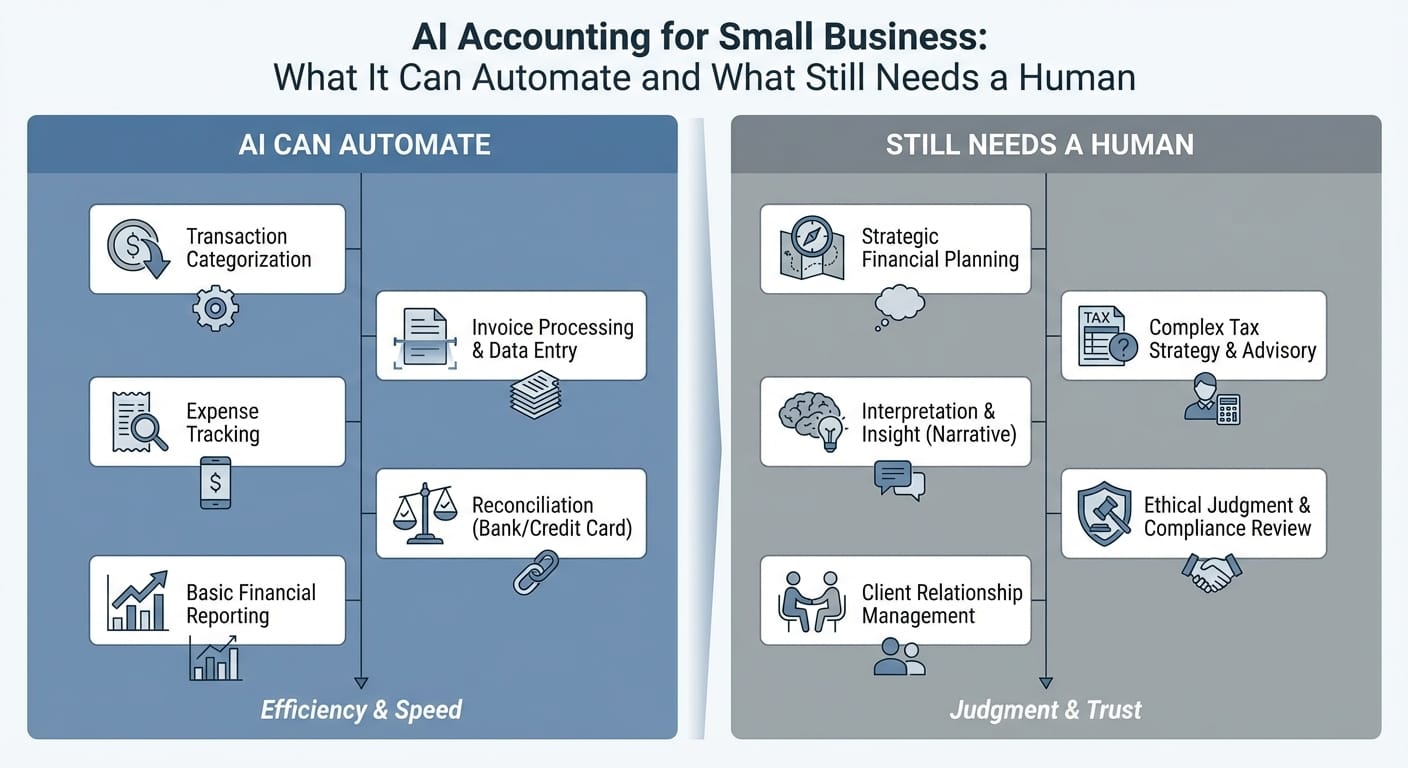
Small businesses are using AI accounting tools to reduce manual work such as data entry, transaction coding, and routine reporting. The benefit is straightforward: fewer hours spent on bookkeeping tasks and quicker access to up-to-date numbers. The tradeoff is that automation can misclassify transactions, miss tax-related details, or create reports that look correct but rely on incorrect inputs.
This guide covers what AI accounting can automate reliably today, what still needs a human (you, a bookkeeper, or a CPA), and how to use AI without creating avoidable cleanup later.
Key takeaways
- AI is best at repetitive, rules-based work: extracting data, suggesting categories, matching receipts, and producing routine reports.
- AI is weaker at judgment: tax treatment, policy decisions, unusual transactions, and anything that depends on business context.
- The most practical setup is hybrid: AI does the first pass, and a human reviews exceptions and makes final calls.
- You’ll get the most value from clean inputs (chart of accounts, bank rules, receipt habits) and a consistent review cadence.
What “AI Accounting” Actually Means (in Small Business Tools)
In small business software, “AI accounting” typically refers to features such as:
- Machine learning categorization (predicting the right account/category)
- Optical character recognition (OCR)) (reading receipts and invoices)
- Automated matching (linking bank transactions to invoices, bills, and receipts)
- Anomaly detection (flagging duplicates, odd amounts, or missing docs)
- Natural language queries (asking “How much did we spend on ads last month?”)
This isn’t a replacement for accounting. It’s a way to reduce the manual steps between money moving and books you can review with confidence. Tools focused on receipt capture and matching—such as ReceiptsAI—generally fit into this “reduce the manual steps” category by helping organize documentation and connect it to transactions.
What AI Can Automate Well (and Where It Delivers the Biggest Time Savings)
1) Receipt capture and data extraction
AI receipt tools can:
- Pull vendor, date, total, tax, and payment method
- Attach documentation to the right transaction
- Reduce missing-receipt follow-up
Best for:
- Lots of small purchases
- Teams with multiple spenders
- Businesses that need consistent documentation
Watch-outs:
- Tips, split receipts, and sales tax are easy to misread
- Vendor names vary (e.g., “AMZN MKTP” vs “Amazon”), which can reduce consistency unless you review and standardize
2) Transaction categorization and coding (first pass)
AI can suggest categories based on:
- Your past coding
- Merchant patterns
- Rules (keywords, thresholds, account mappings)
What it handles well:
- Recurring expenses (rent, subscriptions, internet)
- Frequent vendors with consistent treatment
- Stable patterns where the same thing happens every month
What still needs review:
- New vendors, unusual purchases, refunds, chargebacks
- Gray areas like meals vs. travel vs. supplies
- Owner draws vs. business expenses (especially with mixed-use cards)
3) Bank feed matching and reconciliations (partially)
AI can:
- Match bank transactions to invoices/bills
- Suggest matches when dates and amounts line up
- Flag missing items or potential duplicates
Where it works:
- Companies that invoice regularly
- Payments with clear references (invoice numbers, consistent payer names)
Where humans are still required:
- Split deposits, bundled payments, partial payments
- Stripe/PayPal/Square payouts where fees, refunds, and reserves complicate the numbers
4) Invoicing and accounts receivable (AR) workflows
Common AI features:
- Automated invoice reminders
- Suggested payment terms based on customer behavior
- Draft invoice descriptions based on past invoices
Practical benefits:
- Fewer late payments
- Less follow-up work
- Faster cash collection
Still needs a human:
- Disputes and credit memo decisions
- Custom billing terms or milestone contracts
- Writing clear scope descriptions so invoices align with what was delivered
5) Bill capture and payables workflows (AP)
AI can:
- Extract bill details from PDFs and emails
- Suggest coding and due dates
- Route approvals through simple workflows
Great for:
- Recurring vendor bills
- Small teams that want lightweight approvals
Still needs a human:
- Confirming goods/services were actually delivered
- Deciding CapEx vs. expense treatment
- Investigating duplicates or vendor detail changes (a common point of failure and sometimes fraud)
6) Routine reporting and “what changed?” summaries
AI can generate:
- Monthly P&L and cash flow summaries
- Variance notes (e.g., “Payroll increased 12%”)
- Basic dashboards (AR aging, gross margin, burn rate)
Useful when:
- You need a quick snapshot to run the business
- You want earlier signals for cash issues or expense creep
But it’s not analysis:
- AI can describe changes; a human still needs to confirm the drivers and decide what to do next.
What Still Needs a Human (and Why It Matters)
1) Accounting policy decisions and judgment calls
These require context and consistent choices, such as:
- Capitalize vs. expense (equipment, software setup, improvements)
- Handling reimbursements and employee spending
- Revenue recognition timing (projects, retainers, deposits)
These decisions affect:
- Taxes
- Financial statements
- Month-to-month comparability
2) Tax compliance and filing strategy
AI can help organize data. Humans still need to own:
- Entity strategy and elections (S-corp timing, reasonable comp, deductions)
- Sales tax nexus and product taxability
- Payroll tax compliance and fringe benefits
- Year-end planning (bonuses, equipment timing, retirement contributions)
Errors here don’t just “work themselves out.” They can create penalties, amended returns, and time-consuming cleanup.
3) Reviewing exceptions and edge cases
AI is usually fine with common patterns. Risk concentrates in the exceptions. A human should review:
- Large or unusual transactions
- Vendor changes and bank detail changes
- Refunds, chargebacks, disputed payments
- Related-party activity (owner, family, sister companies)
4) Controls, approvals, and fraud prevention
Automation speeds up payments. It can also speed up mistakes. Humans need to set and monitor:
- Who can add vendors or change payment details
- Approval thresholds
- Separation of duties (even in small teams)
- Regular review of vendor lists and bank rules
5) Communicating with stakeholders
Banks, investors, and landlords often want:
- Clean financial statements
- Explanations for unusual swings
- Supporting documentation
AI can draft summaries, but a human still needs to verify accuracy and provide context.
A Practical Comparison: AI Automation vs. Human Oversight
| Accounting area | What AI can automate well | What still needs a human | Risk if you “set and forget” |
|---|---|---|---|
| Receipt & bill capture | OCR, auto-fill vendor/date/amount, attach docs | Verify tax, split lines, policy compliance | Wrong totals/tax, missing support |
| Transaction categorization | First-pass coding, recurring vendor mapping | New/ambiguous items, owner-use, reclasses | Distorted P&L and tax reporting |
| Reconciliation & matching | Suggested matches, duplicate detection | Processor payouts, partial payments | Unreconciled balances, revenue errors |
| Invoicing & collections | Reminders, follow-ups, templates | Disputes, contract-specific billing | Bad AR, damaged customer relationships |
| Reporting & insights | Summaries, trends, dashboards | Interpretation, decisions, forecasting | Misleading metrics drive bad calls |
| Tax readiness | Document organization, missing-item flags | Filing, elections, compliance, strategy | Penalties, missed deductions, amendments |
Where AI Accounting Tools Commonly Go Wrong (So You Can Avoid It)
Most AI accounting issues are predictable:
- “Clean” reports built on bad coding
A polished P&L isn’t useful if transactions are in the wrong categories.
- Mixed-use spending misclassified
Meals vs. travel vs. supplies. Personal vs. business. Shared subscriptions. AI can guess, but it doesn’t know intent.
- Processor payout confusion (Stripe/PayPal/Square)
Deposits rarely equal sales. Fees, refunds, chargebacks, and timing differences require consistent setup and review.
- Rule stacking and automation drift
New rules can override old ones. Accuracy can degrade slowly until something looks obviously wrong.
- Messy chart of accounts
If categories are vague or duplicative, AI will apply that mess at scale.
A Simple Hybrid Workflow That Works for Most Small Businesses
If you want time savings without a future cleanup project, use a consistent cadence.
Weekly (15–45 minutes)
- Review AI-categorized transactions; approve or correct
- Attach missing receipts for flagged items (receipt-focused tools like ReceiptsAI can help reduce back-and-forth here)
- Check overdue invoices and upcoming bills
Monthly (60–120 minutes)
- Reconcile bank and credit card accounts
- Review top expense categories for spikes or unusual entries
- Check for duplicates, refunds, and uncategorized transactions
- Produce an “owner pack”: P&L, balance sheet, cash summary
Quarterly (with bookkeeper/CPA)
- Review tax estimates and planning actions
- Audit fixed assets and capitalization decisions
- Confirm sales tax and payroll compliance
- Clean up miscodings before they accumulate
Year-end (with CPA)
- Final adjusting entries
- Tax filings and strategy decisions
- Document retention and audit prep
How to Get Started: Implementation Steps That Actually Reduce Work
1) Clean up your chart of accounts (don’t overbuild it)
Keep categories clear and stable. Too many near-duplicate accounts confuse people and software.
Rule of thumb:
- If you won’t manage the business differently based on the split, don’t split it.
2) Standardize receipt capture
Pick one process and enforce it:
- Mobile scan at purchase time
- Vendor emails forwarded to a dedicated address
- Card integrations when available
Tools like ReceiptsAI are typically used at this step to centralize receipts and keep documentation connected to spending.
3) Set approval rules and thresholds
Even if you’re solo, document the basics:
- What needs documentation
- Spend limits by role
- Who can edit vendor and payment details
4) Train the system with corrections (and document decisions)
AI improves when you correct it consistently. Keep a short “coding decisions” doc:
- Meals policy (and what counts)
- How contractor costs are coded
- What qualifies as COGS vs. operating expense
5) Keep a human review loop
The goal isn’t full automation; it’s controlled automation:
- AI handles volume
- Humans handle judgment and risk
Conclusion: Use AI to Do the Work. Don’t Let It Own the Books.
AI accounting can reduce busywork: data extraction, routine categorization, document matching, and basic reporting. It still isn’t a substitute for tax nuance, policy decisions, edge cases, or internal controls—areas where small errors can become expensive.
Next steps
- Turn on automation for receipt capture and first-pass categorization.
- Review weekly; fix exceptions and miscoding early.
- Reconcile monthly and review quarterly with a bookkeeper or CPA.
- Document key accounting decisions so the system stays consistent.
Used correctly, AI frees you (and your accountant) to spend more time on decisions and less time on data entry.



