


Running a small business means wearing a lot of hats. Bookkeeping is often the hat that fits the worst. It takes time you do not have, requires precision you cannot always guarantee, and rarely feels like the best use of your energy.
AI bookkeeping tools are changing that. They handle repetitive financial tasks faster and more accurately than manual entry, freeing you to focus on actually running your business. But not all automation delivers equal value right away. Some features save hours per week from day one. Others are nice to have eventually.
This article walks you through where AI bookkeeping makes the biggest immediate difference for small business owners, so you can prioritize the right tools and get your time back faster.
Key Takeaways
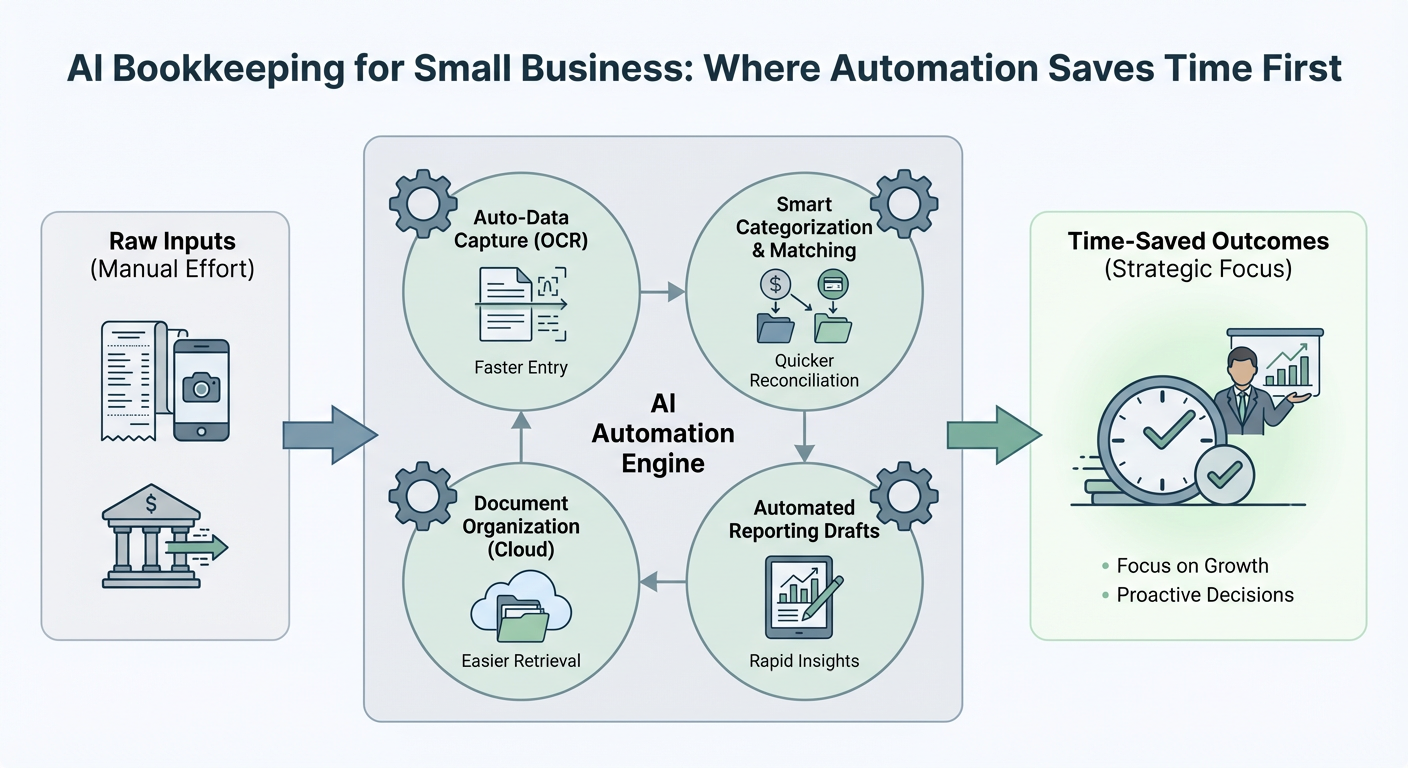
- AI bookkeeping saves the most time on transaction categorization, receipt capture, and bank reconciliation
- Most small businesses see meaningful time savings within the first 30 days of using AI tools
- You do not need to automate everything at once. Start with the tasks you repeat most often
- AI reduces errors in data entry, which also saves time spent fixing mistakes later
- The best AI bookkeeping tools integrate with software you already use
Why Small Business Bookkeeping Eats So Much Time
Before looking at solutions, it helps to understand the problem clearly.
Most small business owners spend between 5 and 15 hours per month on bookkeeping tasks. That number climbs during tax season. The time drain comes from a few specific activities:
- Manually entering transactions from bank statements
- Sorting expenses into the right categories
- Chasing down receipts and matching them to transactions
- Reconciling accounts at the end of the month
- Preparing reports for accountants or tax preparers
These tasks are not complicated. They are just tedious, repetitive, and unforgiving of mistakes. That is exactly the kind of work AI handles well.
Where AI Saves Time First
1. Transaction Categorization
This is the single biggest time saver for most small businesses.
Every purchase your business makes needs to land in the right expense category. Office supplies, travel, software subscriptions, meals with clients. Doing this manually means reviewing every line item and making a judgment call.
AI tools learn your spending patterns and categorize transactions automatically. After a short learning period, most tools get it right the majority of the time. You review exceptions rather than every single entry.
What this looks like in practice:
- AI imports transactions from your bank or credit card automatically
- Each transaction gets a suggested category based on the vendor and your history
- You approve, adjust, or override with a click
- The system learns from your corrections and improves over time
For a business with 50 to 200 transactions per month, this alone can save two to four hours monthly.
2. Receipt Capture and Matching
Paper receipts and email confirmations are a constant headache. Losing one can mean a missed deduction or a reconciliation problem later.
AI receipt tools let you photograph a receipt with your phone or forward an email confirmation. The software reads the amount, date, and vendor automatically using optical character recognition. It then matches the receipt to the corresponding transaction in your books.
Benefits you notice immediately:
- No more shoebox of paper receipts
- Receipts are attached to transactions automatically
- Your records are audit-ready without extra effort
- You stop spending time hunting for documentation at tax time
This feature pays off most for business owners who travel frequently or make a lot of small purchases throughout the month.
3. Bank Reconciliation
Reconciling your books with your bank statement used to mean sitting down with two columns of numbers and finding every discrepancy. It is slow and easy to get wrong.
AI bookkeeping tools connect directly to your bank accounts and credit cards through secure integrations. Transactions import automatically and match against your recorded entries. The software flags anything that does not line up.
Instead of building the reconciliation from scratch, you are reviewing a short list of flagged items. For most small businesses, monthly reconciliation drops from a few hours to under 30 minutes.
4. Invoicing and Payment Tracking
If you bill clients, AI can handle much of the invoicing workflow.
Modern tools can:
- Generate invoices automatically based on completed work or recurring schedules
- Send payment reminders without you lifting a finger
- Record payments when they come in
- Flag overdue invoices so nothing slips through
This matters because chasing payments takes time and feels awkward. Automating reminders removes that friction and keeps your cash flow visible without manual tracking.
5. Expense Reporting
For businesses with employees or contractors who submit expenses, AI dramatically speeds up the review process.
Employees submit expenses through an app. AI checks them against your policies, flags anything unusual, and routes approvals automatically. You spend time only on exceptions, not on reviewing every line.
How AI Bookkeeping Tools Compare on Key Features
| Feature | Time Saved Per Month | Best For | Learning Curve |
|---|---|---|---|
| Transaction categorization | 2 to 4 hours | All small businesses | Low |
| Receipt capture | 1 to 3 hours | Frequent purchasers, travelers | Very low |
| Bank reconciliation | 1 to 3 hours | All small businesses | Low |
| Automated invoicing | 1 to 2 hours | Service businesses, freelancers | Low to medium |
| Expense reporting | 1 to 2 hours | Teams with multiple spenders | Medium |
These estimates vary based on transaction volume and how consistently you use the tools. Businesses with higher transaction counts see proportionally larger savings.
What AI Bookkeeping Does Not Replace
It is worth being honest about the limits.
AI bookkeeping tools handle data entry, categorization, and routine workflows very well. They do not replace professional judgment on complex tax questions, strategic financial planning, or situations that require context a machine cannot easily learn.
You still benefit from working with an accountant or bookkeeper, especially for:
- Year-end tax preparation
- Business structure decisions
- Financial forecasting and planning
- Handling audits or disputes
The difference is that your accountant spends less time on data cleanup and more time on advice that actually moves your business forward. That is a better use of their expertise and your money.
How to Get Started Without Overwhelming Yourself
The mistake many small business owners make is trying to automate everything at once. That leads to a complicated setup, a steep learning curve, and frustration.
A better approach:
1. Start with bank feeds and transaction categorization. Connect your business bank account and credit card. Let the AI import and categorize transactions for one month. Review and correct as needed.
2. Add receipt capture next. Download the mobile app and start photographing receipts immediately after purchases. Build the habit before adding more features.
3. Set up bank reconciliation. Once your transactions are flowing in automatically, reconciliation becomes much faster. Do it at the end of your first full month.
4. Layer in invoicing or expense tools only after the core features feel comfortable.
Most people find that steps one and two alone justify the cost of the software within the first month.
Conclusion
AI bookkeeping is not about replacing your entire financial process overnight. It is about finding the tasks you repeat most often and letting software handle them reliably.
For most small businesses, the biggest wins come from transaction categorization, receipt capture, and bank reconciliation. These three areas alone can recover several hours every month, reduce errors, and make tax time significantly less stressful.
Start small, build the habit, and expand from there. The time you get back is time you can put toward the parts of your business that actually need you.



