


Managing expense reports is one of those tasks that nobody enjoys but everyone has to deal with. For small teams, the problem is especially painful. There is no dedicated finance department to absorb the workload, so the burden falls on founders, office managers, or employees who would rather be doing almost anything else.
The good news is that AI-powered expense tools have made serious progress. What used to take hours of manual data entry, receipt hunting, and spreadsheet wrangling can now be handled in minutes.
This article explains how AI expense reporting works, what small teams should look for in a tool, and how to get started without a complicated rollout.
Key Takeaways
- AI can automate receipt scanning, categorization, and approval workflows
- Small teams save the most time by eliminating manual data entry
- The best tools integrate with accounting software your team already uses
- Setup does not need to be complicated or expensive
- Even a basic AI expense tool can save several hours per month per employee
What Makes Expense Reporting So Painful for Small Teams
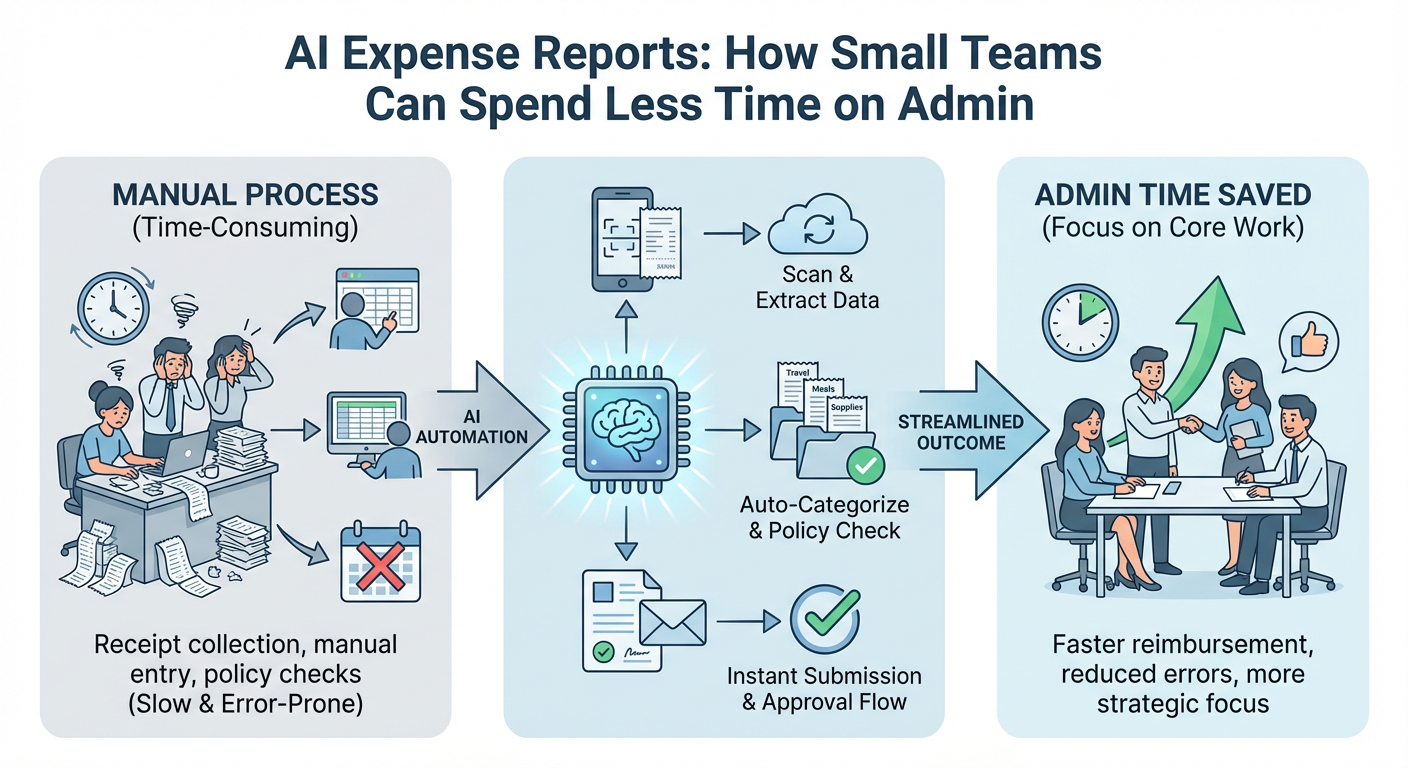
Small teams wear a lot of hats. When someone has to submit expenses, they are usually doing it on top of their actual job. The same goes for whoever has to review and approve those expenses.
The traditional process looks something like this:
- Employee collects paper or digital receipts throughout the month
- Employee manually enters each receipt into a spreadsheet or form
- Manager reviews the spreadsheet and checks for errors
- Finance or the founder approves and processes reimbursements
- Receipts get lost, categories are wrong, and the whole cycle repeats
This process is slow, error-prone, and demoralizing. For a team of five to fifteen people, it can easily consume several hours every month that could go toward actual work.
How AI Changes the Expense Reporting Process
AI expense tools tackle the most tedious parts of the workflow automatically. Here is what modern AI can do:
Receipt Scanning and Data Extraction
Employees take a photo of a receipt with their phone. The AI reads the merchant name, date, amount, and currency. No manual typing required.
Automatic Categorization
The AI assigns each expense to the right category based on the merchant type and past patterns. Over time, it learns your team's spending habits and gets more accurate.
Policy Checks
AI can flag expenses that fall outside company policy before they ever reach a manager. This reduces back-and-forth and speeds up approvals.
Approval Routing
Some tools automatically route expenses to the right approver based on amount, department, or expense type. No more chasing people down over email.
Accounting Integration
Once approved, expenses sync directly to your accounting software. No re-entering data, no reconciliation headaches.
What Small Teams Should Look for in an AI Expense Tool
Not every expense tool is built with small teams in mind. Some are designed for enterprise companies with complex approval hierarchies and dedicated finance staff. Here is what actually matters for a small team:
Ease of Use
If employees find the tool confusing, they will not use it consistently. Look for a mobile app with a clean receipt capture experience.
Quick Setup
Small teams cannot afford a months-long implementation. The best tools get you up and running in a day or two.
Accounting Integrations
Make sure the tool connects to whatever you already use, whether that is QuickBooks, Xero, FreshBooks, or something else.
Flexible Approval Workflows
You need something simple enough for a five-person team but flexible enough to grow with you.
Transparent Pricing
Many tools charge per user per month. Make sure the pricing makes sense for your team size and does not balloon as you add people.
Comparing Popular AI Expense Tools for Small Teams
| Tool | Best For | AI Features | Accounting Integration | Starting Price |
|---|---|---|---|---|
| Expensify | Freelancers and small teams | Receipt scanning, SmartScan | QuickBooks, Xero, NetSuite | Free tier available |
| [Ramp](https://ramp.com/accounting-automation-software) | Fast-growing startups | Auto-categorization, policy enforcement | QuickBooks, Xero, Sage | Free (card-based) |
| [Brex](https://www.brex.com/) | Tech startups with investors | AI categorization, real-time tracking | QuickBooks, Xero, NetSuite | Free (card-based) |
| Zoho Expense | Budget-conscious small businesses | OCR scanning, mileage tracking | Zoho Books, QuickBooks | From $4/user/month |
| Spendesk | Teams wanting spend controls | AI receipt matching, approval flows | Xero, QuickBooks, Datev | Custom pricing |
This table is a starting point, not a final answer. The right tool depends on your team's size, how you pay for things, and which accounting software you already use.
How to Roll Out an AI Expense Tool Without Disrupting Your Team
Switching tools always carries some friction. Here is a simple approach that keeps disruption low:
Step 1: Audit Your Current Process
Before choosing a tool, write down exactly how expenses are handled today. Who submits them? Who approves them? Where do receipts go? This helps you identify the biggest pain points and makes it easier to evaluate whether a new tool actually solves them.
Step 2: Pick One Tool and Run a Short Pilot
Do not try to evaluate five tools at once. Pick the one that looks most promising based on your needs and run a two-week pilot with two or three employees. Get their honest feedback.
Step 3: Set Up Your Expense Policy First
AI tools can only enforce rules you have defined. Before going live, document your expense categories, spending limits, and approval chain. Most tools will walk you through this during setup.
Step 4: Train Your Team in One Session
A thirty-minute walkthrough is usually enough. Show employees how to capture receipts, how to submit expenses, and what the approval process looks like. Keep it simple.
Step 5: Connect Your Accounting Software
This is the step that saves the most time in the long run. Once expenses sync automatically to your books, you eliminate a whole layer of manual reconciliation.
Common Mistakes Small Teams Make with Expense Reporting
Even with a good tool in place, a few habits can undermine the whole system:
- Waiting until month-end to submit expenses. Encourage employees to submit receipts the same day or within a few days. The longer they wait, the more likely receipts are to get lost.
- Skipping the expense policy. Without clear rules, employees guess at categories and managers spend time correcting errors. A short, written policy prevents most of these problems.
- Choosing a tool based on features alone. A tool with every feature imaginable is useless if your team finds it confusing. Prioritize usability over feature lists.
- Not reviewing AI categorizations. AI is accurate but not perfect. Build a quick review step into your approval process until you trust how the tool categorizes your specific expenses.
The Real Time Savings: What to Expect
The time savings from AI expense tools are real, but they vary based on how manual your current process is.
For a team of ten people submitting expenses monthly, realistic estimates look like this:
- Receipt capture: 3 to 5 minutes per expense instead of 10 to 15 minutes of manual entry
- Categorization: Near-zero time with AI handling the first pass
- Approval: 50 to 70 percent faster with automated policy checks and routing
- Reconciliation: Hours saved each month when expenses sync directly to accounting software
Across a full year, that adds up to dozens of hours returned to actual work.
Conclusion: Start Small, Get the Basics Right
AI expense reporting is not magic, but it is genuinely useful. For small teams, the biggest wins come from eliminating manual data entry, automating categorization, and connecting directly to your accounting software.
You do not need the most advanced tool on the market. You need one that your team will actually use.
Practical next steps:
1. Write down how your current expense process works and where it breaks down
2. Choose one tool from the comparison table and sign up for a free trial
3. Set up a simple expense policy before going live
4. Run a two-week pilot with a small group before rolling out to everyone
5. Review the time saved after your first full month and adjust from there
The admin will never be the most exciting part of running a small team. But with the right AI tool in place, it can stop being a burden.



