


Expense tracking is important for businesses to claim deductions with documentation, spot waste early, and make decisions with current numbers.
In 2026, the best way to track expenses is a simple, mostly automated system that pulls transactions from your bank, captures receipts with minimal effort, and keeps categories consistent.
This guide lays out the standard setup that works for most small businesses, plus alternatives depending on your size and business model, and a workflow you can implement this week.
Key takeaways
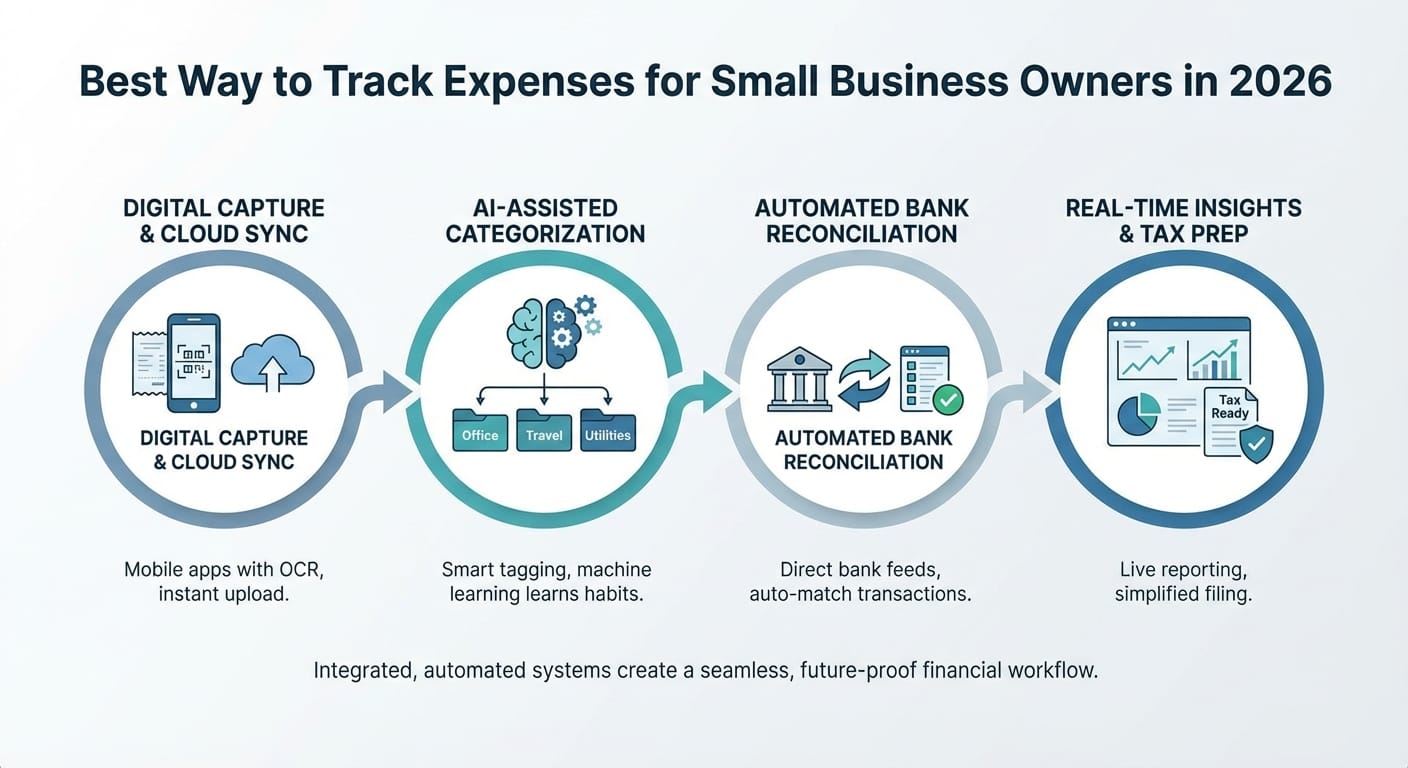
- Best overall approach in 2026: bank feeds + automated receipt capture + simple category rules + monthly review.
- Skip spreadsheets unless you have very few transactions. They become hard to maintain quickly.
- Separate business and personal money (dedicated bank account + card) to reduce cleanup time.
- Track for decisions, not perfection: consistent categories and receipts beat overly detailed tagging.
- Close monthly, not yearly so you stay tax-ready and avoid surprises.
What “best” means in 2026: the expense-tracking outcomes that matter
A good expense tracking system needs to deliver four things:
1. Completeness: you capture every transaction and the receipts that matter.
2. Accuracy: expenses land in the right categories and can be supported at tax time.
3. Speed: minimal manual entry; automation handles repetitive tasks.
4. Visibility: you can answer “Where did the money go?” without digging.
If receipts are missing, reconciliation happens late, or you do a quarterly scramble, you’ll usually feel it in missed deductions, unclear cash flow, and decisions based on partial information.
The best expense-tracking setup for most small businesses (the 2026 standard)
For most small business owners, the cleanest system is:
Dedicated business accounts + bank feeds + receipt capture + simple categories + monthly close.
1) Use separate business banking and a dedicated business card
This is the fastest way to reduce admin.
- Open a business checking account
- Put expenses on one business credit card whenever you can
- Don’t mix purchases. If you have to, split the receipt right away
Why it works: fewer mixed transactions, cleaner reports, easier reconciliation, and less back-and-forth later.
2) Turn on bank and card feeds (automatic imports)
Most accounting tools (and many expense apps) connect to your bank and import transactions automatically.
What to look for:
- Stable bank syncing
- Frequent updates (daily is fine)
- Clear “matched vs. unmatched” status
- Support for multiple accounts/cards as you grow
3) Automate receipt capture (scan/email-forward)
Manual receipt filing shouldn’t be your system.
Use a setup that lets you:
- Take a photo of a receipt
- Forward emailed receipts to a capture inbox
- Extract merchant, date, and total automatically (OCR/AI)
Tools focused specifically on receipt collection and extraction—such as ReceiptsAI (https://receiptsai.com/)—can be useful here if you want a lightweight way to capture receipts consistently and keep them organized for matching and review.
Practical rule: require receipts for anything above your threshold (often $25–$75) and for client-billable purchases.
4) Use a simple, consistent category set
Overbuilt charts of accounts often create confusion and inconsistent coding. Use categories that map cleanly to tax reporting and basic business decisions.
Common categories:
- Advertising & marketing
- Software & subscriptions
- Office supplies
- Meals (business)
- Travel (airfare, lodging, mileage)
- Contractor labor
- Payroll (if applicable)
- Insurance
- Rent/utilities
- Professional services (legal/accounting)
5) Do a 30–60 minute monthly “close”
Once a month:
- Reconcile bank and credit card accounts
- Categorize anything uncategorized
- Remove duplicates, confirm refunds, flag personal items
- Attach missing receipts
- Review reports (P&L, expenses by category)
Result: you stay tax-ready all year and you can see spending trends while they’re still actionable.
Choose your tracking tool: which option fits your business?
The “best tool” depends on transaction volume, team size, and whether you need project/job tracking.
Expense tracking options comparison (2026)
| Option | Best for | Pros | Cons | Typical workflow |
|---|---|---|---|---|
| Accounting software (with bank feeds) | Most small businesses | One source of truth, solid reporting, tax-ready | Receipt tools vary; setup takes time | Import → categorize → reconcile monthly |
| Expense management app + accounting sync | Teams, lots of receipts, reimbursements | Strong receipt capture, approvals, policies | Another subscription; needs clean syncing | Capture → approve → sync to books |
| Business banking app with categorization | Very small/simple operations | Fast setup, quick snapshot | Limited reporting and tax detail | Spend → auto-categorize → export |
| Spreadsheet | Micro-business, <50 transactions/month | Free, flexible | Manual, error-prone, hard to maintain | Enter → store receipts separately → summarize |
Bottom line:
- For clean books and reporting, start with accounting software + bank feeds.
- If people submit receipts or need reimbursements, add an expense capture layer (for example, a dedicated receipt tool like ReceiptsAI) so receipts don’t live in scattered inboxes and camera rolls.
- Use a spreadsheet only if your volume is tiny and you’ll keep up weekly.
The simplest workflow that stays clean at tax time
If you want something you can stick to, follow this cadence.
Weekly (10 minutes)
- Review imported transactions
- Categorize the obvious ones
- Upload/forward receipts you’ve collected (photo or email-forward)
Monthly (30–60 minutes)
- Reconcile bank and credit card accounts
- Scan category totals for anything unusual
- Make sure required receipts are attached
- Mark client-billable expenses (if applicable)
Quarterly (30–90 minutes)
- Review P&L and cash flow
- Tighten category rules to reduce manual work
- Pull numbers for estimated taxes (if required)
Annually
- Final pass with your accountant/tax preparer
- Export reports/receipts if requested
- Adjust categories only if there’s a clear reason
How to make automation actually work (rules, matching, and consistency)
Automation helps only if it’s reliable. Here’s what typically matters most.
Create merchant-based rules
Examples:
- “Google Ads” → Advertising
- “Stripe fees” → Merchant fees
- “Amazon” → Office supplies (or split when needed)
Start with 10–15 rules for your most common merchants. Add more only when you see repeated manual cleanup.
Use transaction matching to avoid duplicates
Duplicates usually happen when you:
- Import from both bank and card feeds inconsistently
- Upload receipts in a way that creates new transactions instead of matching existing ones
Use tools that match receipts to imported transactions rather than generating separate entries. If you’re using a receipt-focused tool (including ReceiptsAI), the practical goal is the same: keep receipts easy to capture and easy to tie back to the corresponding spend.
Decide how you’ll handle gray areas
These are the usual problem children:
- Meals (client vs. team vs. personal)
- Home office expenses
- Mileage vs. fuel (don’t claim both for the same vehicle use)
- Subscriptions with mixed personal/business use
Write a one-page “expense policy” for yourself (and anyone who spends money for the business). Consistency beats constant debate.
Special cases: the best method by business type
Solo service business (consultants, coaches, freelancers)
Best setup:
- Business checking + business card
- Accounting software with bank feeds
- Receipt capture via email forwarding or mobile scan (a receipt tool like ReceiptsAI can help keep this centralized)
- Monthly close
Extra tip: only track expenses by client/project if you’ll use it (pricing, profitability, billing). Otherwise, skip the extra admin.
Product-based businesses (e-commerce, retail, CPG)
Best setup:
- Accounting software that supports COGS and inventory workflows
- Clear separation of:
- Inventory purchases
- Shipping/postage
- Packaging supplies
- Merchant/marketplace fees
- Returns/refunds
Extra tip: reconcile payment processors monthly (payouts vs. gross sales vs. fees) so the books don’t drift.
Growing teams (reimbursements, approvals, spend controls)
Best setup:
- Expense management app for:
- Receipt capture
- Approvals
- Reimbursements
- Spend policies (limits, categories)
- Sync to accounting for reporting and reconciliation
Extra tip: require receipts at submission and enforce coding upfront. Otherwise, month-end turns into cleanup work. Centralized receipt intake (including tools like ReceiptsAI) can reduce the “missing receipt” loop.
What to track (and what not to overtrack)
Track these consistently
- Merchant, date, amount, category
- Receipt (photo/PDF) when needed
- Business purpose for meals, travel, and anything ambiguous
- Client/project tag only when it affects profitability or billing
- Payment method (helps reconciliation)
Avoid overtracking these unless you truly need them
- Too many subcategories (e.g., “Software—Design,” “Software—Admin,” “Software—Ops”)
- Notes on every small purchase
- Custom tags you never review
The target is usable reporting and clean tax documentation, not perfect granularity.
Red flags your current system isn’t working
If these sound familiar, your process is costing you time and money:
- You reconcile only at tax time (or never)
- “Uncategorized” keeps growing
- You can’t explain month-to-month swings
- Personal and business spending are mixed regularly
- Receipts go missing or you can’t support certain expenses
- You avoid your books because it’s a mess
The fix usually isn’t working harder. It’s using a cleaner system and keeping a monthly routine.
Conclusion: practical next steps (set it up this week)
To set up a solid expense tracking system in 2026, do this in order:
1. Separate finances: open or commit to a dedicated business bank account and card.
2. Turn on bank feeds: make sure transactions import automatically.
3. Enable receipt capture: use mobile scans and email forwarding (a dedicated receipt workflow—such as ReceiptsAI—can make this easier to maintain).
4. Define 10–15 categories you’ll actually use.
5. Create basic rules for frequent merchants.
6. Schedule a monthly close and treat it as part of running the business.
Once it’s in place, expense tracking becomes a short, repeatable process. You’ll have cleaner tax documentation, clearer cash flow, and decisions based on up-to-date numbers.



