

Running a small business means wearing a lot of hats. Bookkeeping is rarely anyone's favorite task, but keeping your expenses properly categorized can save you meaningful time, money, and stress, particularly when tax season arrives.
This article covers the basics of expense categorization, why it matters, which categories most small businesses actually need, and how to build a process that holds up over time.
Key Takeaways
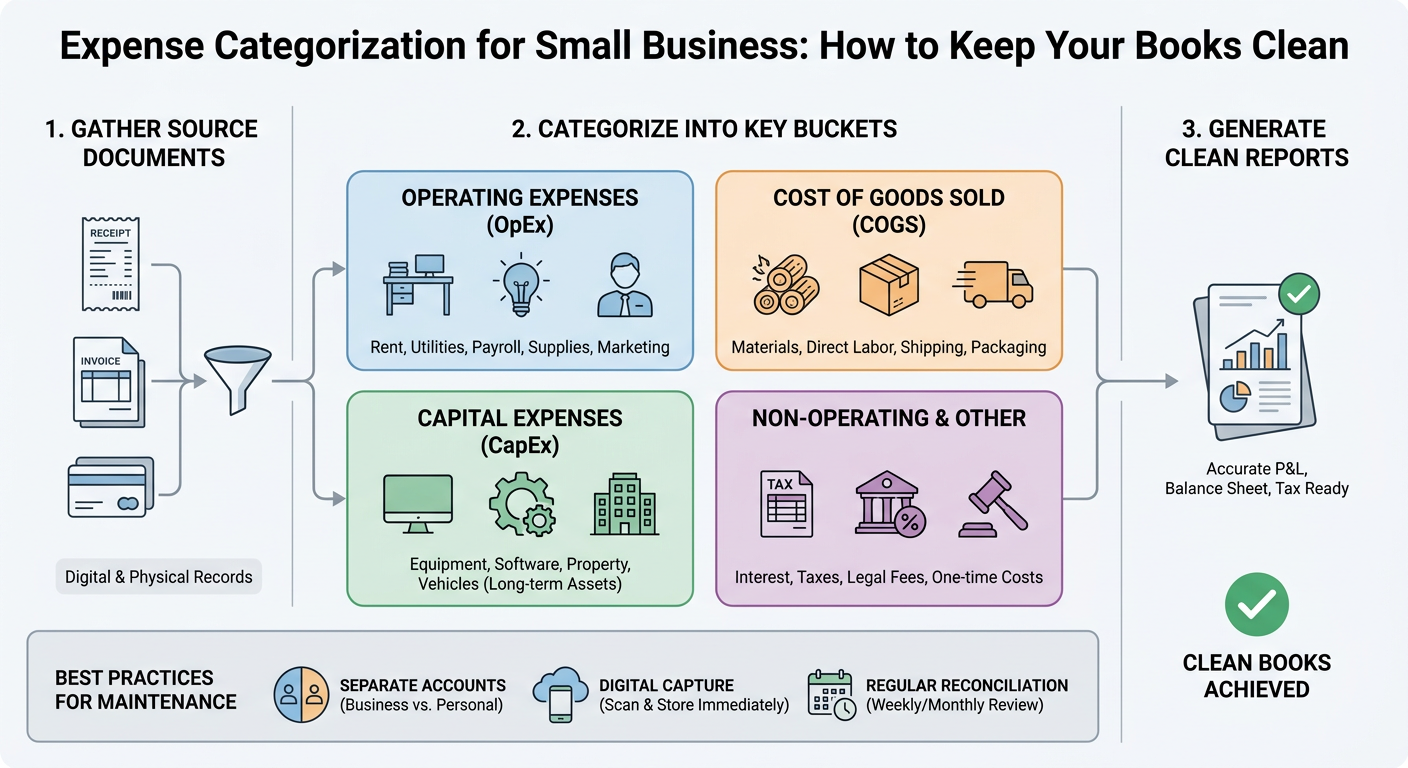
- Proper expense categorization keeps your financial records accurate and audit-ready
- Most small businesses need 10 to 15 core expense categories
- Consistent habits matter more than a perfect system
- The right tools can automate a significant portion of the work
- Misclassified expenses can cost you deductions and create complications at tax time
Why Expense Categorization Matters
Categorizing your business expenses is not simply an organizational exercise. It has a direct effect on your financial outcomes.
Here is what clean categorization does for your business:
- Reduces your tax burden. Properly categorized expenses help ensure you claim every deduction you are entitled to.
- Speeds up tax filing. When your books are in order, your accountant spends less time sorting through transactions, which typically means lower accounting fees.
- Improves financial visibility. You can see clearly where your money is going and make more informed decisions.
- Keeps you audit-ready. Well-organized records are a practical safeguard if the IRS ever requests documentation.
- Supports cash flow planning. Understanding your expense patterns makes forecasting more reliable.
The cost of neglecting this is tangible. Disorganized books lead to missed deductions, unexpected tax bills, and time-consuming cleanup work.
The Most Common Small Business Expense Categories
Most small businesses work from a variation of the same core categories. The IRS has its own classifications, but you can structure your chart of accounts in a way that suits your business while still mapping correctly to the relevant tax lines.
Here are the categories most small businesses will need:
Operating Expenses
- Rent and utilities
- Office supplies
- Software and subscriptions
- Phone and internet
People and Payroll
- Employee wages and salaries
- Contractor payments (1099 workers)
- Payroll taxes and benefits
Marketing and Sales
- Advertising (digital and print)
- Website costs
- Promotional materials
Travel and Transportation
- Business travel (flights, hotels, meals)
- Mileage and vehicle expenses
- Parking and tolls
Professional Services
- Accounting and bookkeeping fees
- Legal fees
- Consulting costs
Cost of Goods Sold (COGS)
- Inventory purchases
- Raw materials
- Direct labor tied to production
Other Common Categories
- Insurance premiums
- Loan interest
- Depreciation
- Taxes and licenses
- Charitable contributions (business-related)
You do not need a category for every conceivable expense. Start with the ones relevant to your business and expand only when you have a clear, recurring need.
How to Set Up Your Categorization System
Getting started is more straightforward than most people expect. The goal is a simple, repeatable process you can maintain without significant effort.
Step 1: Choose your accounting software
Most small businesses use one of a handful of tools. QuickBooks, FreshBooks, Wave, and Xero are among the most widely used. Each allows you to create custom expense categories and connect your bank accounts for automatic transaction imports.
Step 2: Build your chart of accounts
Your chart of accounts is the master list of categories you use to track income and expenses. Keep it simple. Too many categories create confusion and make reports harder to interpret.
Step 3: Connect your bank and credit card accounts
Linking your accounts means transactions flow in automatically. You review and categorize them rather than entering data by hand. This step alone can save several hours each month.
Step 4: Set up rules for recurring transactions
Most accounting tools allow you to create rules that automatically categorize transactions from the same vendor. A charge from your internet provider, for example, can be tagged as a utility expense without any manual input.
Step 5: Schedule a weekly review
Do not let transactions accumulate. Setting aside 15 to 30 minutes each week to review anything that was not sorted automatically is far less work than a monthly cleanup. Tools that include receipt capture, such as Receipts AI, can reduce the manual effort involved in this step by extracting and organizing receipt data automatically.
Common Categorization Mistakes to Avoid
Even well-intentioned business owners run into these issues. Recognizing them in advance makes them easier to avoid.
Mixing personal and business expenses
This is the most frequent mistake. Use a dedicated business bank account and credit card. Personal purchases should never run through your business accounts.
Using a catch-all miscellaneous category
Miscellaneous is a trap. When you are unsure where something belongs, take the time to find out. A large miscellaneous balance raises questions during an audit and makes your reports far less useful.
Forgetting to track cash expenses
Cash transactions are easy to overlook. Keep receipts and log them promptly, or use an expense tracking app. Receipt scanning tools can make this habit easier to maintain consistently.
Misclassifying meals and entertainment
Business meals are deductible, but only under specific conditions. Entertainment expenses carry stricter rules. When in doubt, consult your accountant before assigning a category.
Not separating COGS from operating expenses
If you sell products, your cost of goods sold should be tracked separately from general operating expenses. This distinction affects your gross profit calculation and your tax return.
Expense Categorization Tools Compared
The right tool depends on your business size, budget, and how much manual involvement you want in the process.
| Tool | Best For | Price Range | Automation Level |
|---|---|---|---|
| QuickBooks Online | Growing businesses with more complex needs | $30 to $90/month | High |
| Xero | Businesses that prioritize detailed reporting | $15 to $78/month | High |
| FreshBooks | Freelancers and service-based businesses | $17 to $55/month | Medium |
| Wave | Very small businesses or early-stage startups | Free (paid add-ons) | Medium |
| Zoho Books | Budget-conscious small businesses | Free to $20/month | High |
All of these tools support bank feeds, custom categories, and basic reporting. The differences come down to feature depth, available integrations, and how well the interface fits your workflow.
For businesses that deal with a high volume of receipts, pairing your accounting software with a dedicated receipt processing tool like Receipts AI can reduce the time spent on manual data entry and help keep categorization consistent.
Tips for Keeping Your Books Clean Long-Term
Setting up a system is only part of the work. Maintaining it consistently is where many businesses fall short.
- Reconcile monthly. Compare your accounting records against your bank statements every month. Catching errors early prevents them from compounding.
- Save receipts digitally. Use a scanning app or your accounting software's receipt capture feature. Paper receipts fade and are easily misplaced.
- Review your categories quarterly. As your business evolves, your spending patterns change. Confirm your categories still reflect how you actually operate.
- Consider working with a bookkeeper. Even a few hours a month with a professional can keep your records accurate and surface issues before they become problems.
- Separate business and personal finances from the start. If you have not done this yet, it is the single most impactful step you can take toward cleaner books.
Conclusion
Clean books begin with consistent categorization. You do not need a complicated system or premium software to get it right. You need a clear set of categories, a reliable tool, and a regular habit of reviewing your transactions.
Your next steps:
1. Open a dedicated business bank account if you do not already have one
2. Choose an accounting tool that fits your budget and the size of your business
3. Build a straightforward chart of accounts with 10 to 15 categories
4. Connect your accounts and configure automation rules
5. Block 20 minutes on your calendar each week for bookkeeping
The time you put in now will pay off consistently throughout the year, and especially when tax season arrives.



