


Bank reconciliation is just quality control for your cash. Do it monthly and you catch errors, avoid overdrafts, and keep your books ready for taxes. With a tight workflow, it takes about 15 minutes.
Quick Take (Key Takeaways)
- Reconcile in three passes: clear easy matches, fix exceptions, confirm balances.
- Use the right inputs: your bank’s CSV export, bookkeeping software (QuickBooks, Xero, Wave), or a simple spreadsheet. References:
- QuickBooks reconciliation overview: https://quickbooks.intuit.com/learn-support/en-us/help-article/reconcile-accounts/
- Xero reconciliation basics: https://central.xero.com/s/article/Reconcile-bank-accounts
- If you only have PDF statements, convert them into structured transactions first (for example, ReceiptsAI’s credit card statement extractor can turn a PDF into Excel/CSV): https://receiptsai.com/tools/credit-card-statement-extractor
- Speed comes from prep: keep business and personal separate, standardize categories, capture receipts as you go.
- Check the usual culprits: pending vs posted, bank fees, merchant deposits, refunds, duplicates.
- Finish clean: statement ending balance = books ending balance, plus a short note on any legit timing differences.
Why reconciliation feels hard (and how we’ll make it easy)
Reconciliation feels hard because it’s never “just matching.” Bank descriptions are vague, receipts go missing, and it’s easy to wonder if your numbers are quietly wrong.
Skip it for a couple months and the mess compounds: miscategorized expenses, bogus profit numbers, surprise cash shortfalls, and extra paid time at tax season.
The fix is not some fancy accounting trick. It’s a basic verification process you can run the same way every time. Below is a 15-minute workflow that works in software or a spreadsheet, plus a checklist for when things don’t match.
Set yourself up for a 15-minute reconcile (2 minutes of prep)
The fastest reconcile is the one you made easy all month. You don’t need perfect books. You need fewer surprises.
Do these setup steps once, then maintain them:
- Use one bank account and one card for business as much as possible. Mixing personal and business transactions is the fastest way to turn reconciliation into cleanup.
- Turn on bank feeds in your bookkeeping tool (QuickBooks, Xero, Wave). If you don’t use software, download a CSV from your bank each month and stick to the habit. If your issuer only provides PDFs, you can extract transactions into a spreadsheet first using a PDF-to-Excel tool (e.g., https://receiptsai.com/tools/credit-card-statement-extractor).
- Standardize categories and rules:
- In software, create rules like “STRIPE” → “Sales income” or “GOOGLE*ADS” → “Advertising.”
- In a spreadsheet, use a category dropdown so you stop inventing labels every month.
- Capture receipts at purchase time. Use your phone, a receipt app, or an inbox folder. Missing receipts are what turn 15 minutes into an hour.
- Pick a reconciliation rhythm:
- Monthly is fine for many businesses.
- Weekly is often easier if cash is tight or volume is high (e-commerce, ads, lots of subscriptions).
Example: if you have recurring subscriptions and regular ad spend, rules handle most of it. Your “exceptions” shrink to a short list, and the reconcile becomes mostly matching.
The 15-minute reconciliation workflow (three passes that always work)
Work in three passes. Do not bounce around the list. Your goal is to clear the easy stuff fast, isolate the weird stuff, then confirm the balance.
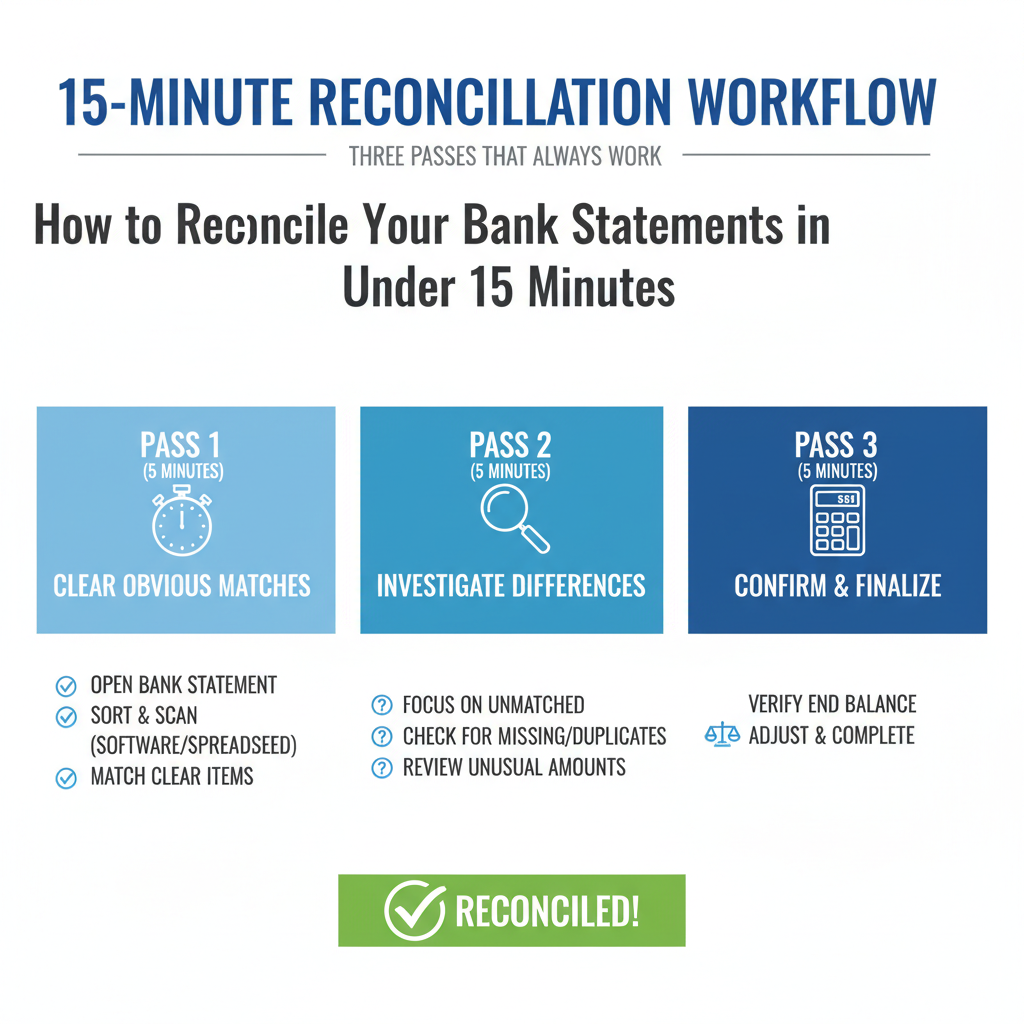
Pass 1 (5 minutes): Clear the obvious matches
This pass is volume. You are trying to clear 70 to 90 percent without thinking too hard.
- Open the correct bank statement period (usually last month).
- In bookkeeping software:
- Go to the bank feed or reconciliation screen.
- Sort by date, then scan amounts.
- Match items that clearly line up (invoice payments, recurring subscriptions, known vendors).
- In a spreadsheet:
- Import your bank CSV into one tab. (If your bank/card statement is only available as a PDF, convert it into Excel/CSV first so you can sort and filter.)
- Keep your book transactions (what you recorded) in a second tab.
- Sort both by amount, then date. Mark items “cleared” when amount, date, and payee line up.
Time saver: start with the biggest or most frequent items first. Payroll, rent, Stripe or PayPal deposits, and ad platforms explain most of the movement and are easy to spot.
Pass 2 (7 minutes): Triage and resolve exceptions
Now you deal with what didn’t match. Do not stare at the full list. Build an exception queue and knock it down.
Common exceptions and quick fixes:
- Pending vs posted: If it was pending at month-end, it may not be on the statement. Leave it for the next reconcile.
- Bank fees and interest: Add the fee or interest entry to your books so your ledger mirrors the bank.
- Merchant deposits (Stripe, Square, PayPal): Deposits often hit net of fees or as batch totals. Match the batch deposit, then record fees correctly (often as a separate expense).
- Refunds and chargebacks: These can show up days later and with different descriptions. Search by amount first.
- Duplicates: You might have a duplicate from a bank feed reconnect, or you entered it manually and the feed brought it in again. Keep one. Delete, void, or exclude the other.
Concrete example: your bank shows a $975 Stripe deposit, but your books show three invoices totaling $1,000. The missing $25 is Stripe fees. Record $1,000 as income, record $25 as processing fees, and match the $975 net deposit to the batch (how you do this depends on your software setup).
Pass 3 (3 minutes): Confirm the ending balance
This is where you finish, not where you guess.
- Compare the bank statement ending balance to your reconciliation screen (or your spreadsheet running balance).
- If they match, save the reconciliation report.
- If they do not match, do not force it. The mismatch comes from a specific, findable issue. Use the checklist below.
The mismatch checklist: find the error in minutes (not hours)
When balances don’t match, random searching is what burns time. Use a checklist and work top to bottom.
1. Check the statement period
Confirm you used the exact statement start and end dates. Off-by-one-day errors are common, especially around weekends and holidays.
2. Look for missing transactions
- Scan the bank statement for entries that never made it into your books: fees, interest, ATM adjustments, wire fees, merchant service fees.
- In software, filter for “uncategorized,” “review,” or “not matched.”
3. Check for duplicates
- Search your books for the same amount on the same date, especially for recurring charges.
- If you recently reconnected a bank feed, look for double imports.
4. Confirm the opening balance wasn’t changed
If you edited a prior reconciled transaction, your opening balance shifts and the current month will never tie out. Most tools flag this. Fix it by:
- Reverting the change, or
- Re-reconciling from the point where the change occurred (slow, but sometimes necessary).
5. Validate transfers between accounts
Transfers cause a lot of “my books are off” problems:
- One side gets categorized as an expense instead of a transfer.
- The transfer is recorded twice.
- One side is entered with the wrong date or amount.
Make sure the transaction is coded as a transfer and matches on both accounts.
6. Separate real timing differences from mistakes
Checks not cashed, pending card transactions, and deposits in transit can be legitimate timing gaps. Track them. Do not bury them by “making the numbers work.”
Sanity check by the size of the mismatch:
- Off by $0.01 to $2.00: rounding, partial refunds, or split transactions.
- Off by clean numbers like $50, $100, $500: missing entry, duplicate entry, or transfer coded wrong.
Real-world speed strategies for freelancers and small businesses
If you want reconciliation to stay under 15 minutes, design your system so exceptions are rare and easy to identify.
1) Batch your income streams
If you get paid through ACH, checks, Stripe, PayPal, and marketplaces, matching gets slower because descriptions vary and deposits don’t always equal invoices.
- In software, use clearing accounts for Stripe and PayPal so deposits match cleanly.
- In a spreadsheet, keep a simple sales log by platform and date so you can tie deposits to batches.
2) Make recurring expenses auto-categorize
Most businesses have a predictable stack of recurring charges: software, insurance, internet, rent, tools, phone.
- Set rules so these hit the right category automatically.
- Review rules quarterly. Vendor names change and rules break quietly.
3) Handle reimbursements and owner draws correctly
This is where freelancer books go off the rails.
- If you pay a business expense personally, record it as an owner contribution (or “due to owner”). Do not leave it floating as an expense that never touches the business bank account.
- If you reimburse yourself from the business account, categorize it as an owner draw or reimbursement, not as an operating expense (unless your accountant wants a different treatment).
Scenario: you buy a $68 client gift on your personal card. If you don’t record it properly, the later $68 reimbursement from the business account looks like a random charge and wastes time. A clean reimbursement process eliminates that noise.
4) Reconcile more often if volume is high
If you have daily sales, heavy ad spend, or lots of subscriptions, weekly reconciliation is usually faster than monthly. You match while transactions are still familiar, and you catch problems before they snowball.
5) Save your reconciliation proof
Store three things in the same place:
- The reconciliation report
- The bank statement PDF
- A short note on any timing differences or weird items you left outstanding
This helps at tax time, during audits, and when you are trying to remember why last month had an odd gap.
A simple 15-minute monthly routine you can repeat
Reconciliation gets easy when it’s scheduled and boring.
- Day 1 to 3 of the month (15 minutes): Reconcile the prior month as soon as the statement is available.
- Mid-month (optional 5 minutes): Quick review to categorize new transactions and catch anything suspicious early.
- End of month (2 minutes): Quick cash check. Make sure you did not miss a major bill, loan payment, or tax set-aside.
If you use accounting software, keep two guardrails:
- Do not edit reconciled transactions unless you have a specific reason and you document it.
- Keep uncategorized transactions near zero. That clutter is what slows you down next month.
If you run spreadsheets, keep it simple:
- Tab 1: Bank CSV (raw import)
- Tab 2: Books (your categorized transactions)
- Tab 3: Reconcile view (unmatched filters plus a running balance)
Tools change. The process does not: match, fix exceptions, confirm the ending balance.
Conclusion: clean books, less stress, better decisions
Reconciling in under 15 minutes is realistic if you stick to a system. Prep your accounts and rules, clear the easy matches first, isolate exceptions, then confirm the ending balance without forcing it.
Block 15 minutes right after your statement closes and run the three-pass workflow. If you want platform-specific steps, use these guides:
- QuickBooks: https://quickbooks.intuit.com/learn-support/en-us/help-article/reconcile-accounts/
- Xero: https://central.xero.com/s/article/Reconcile-bank-accounts
Do one focused reconcile, write down the few recurring exceptions you see, and the next one gets even faster.



