


Manual cash tracking in spreadsheets is one of those tasks that feels manageable at first. You build a tidy little sheet, add some formulas, and think you have it under control. Then the data grows, the errors creep in, and suddenly you are spending hours every week just keeping the numbers straight.
If your team is still reconciling cash positions by hand in Excel or Google Sheets, you are not alone. But there are practical ways to cut that time significantly without abandoning spreadsheets entirely or investing in expensive software right away.
This article walks you through the most effective strategies to streamline manual cash tracking, reduce errors, and free up time for higher-value work.
Key Takeaways
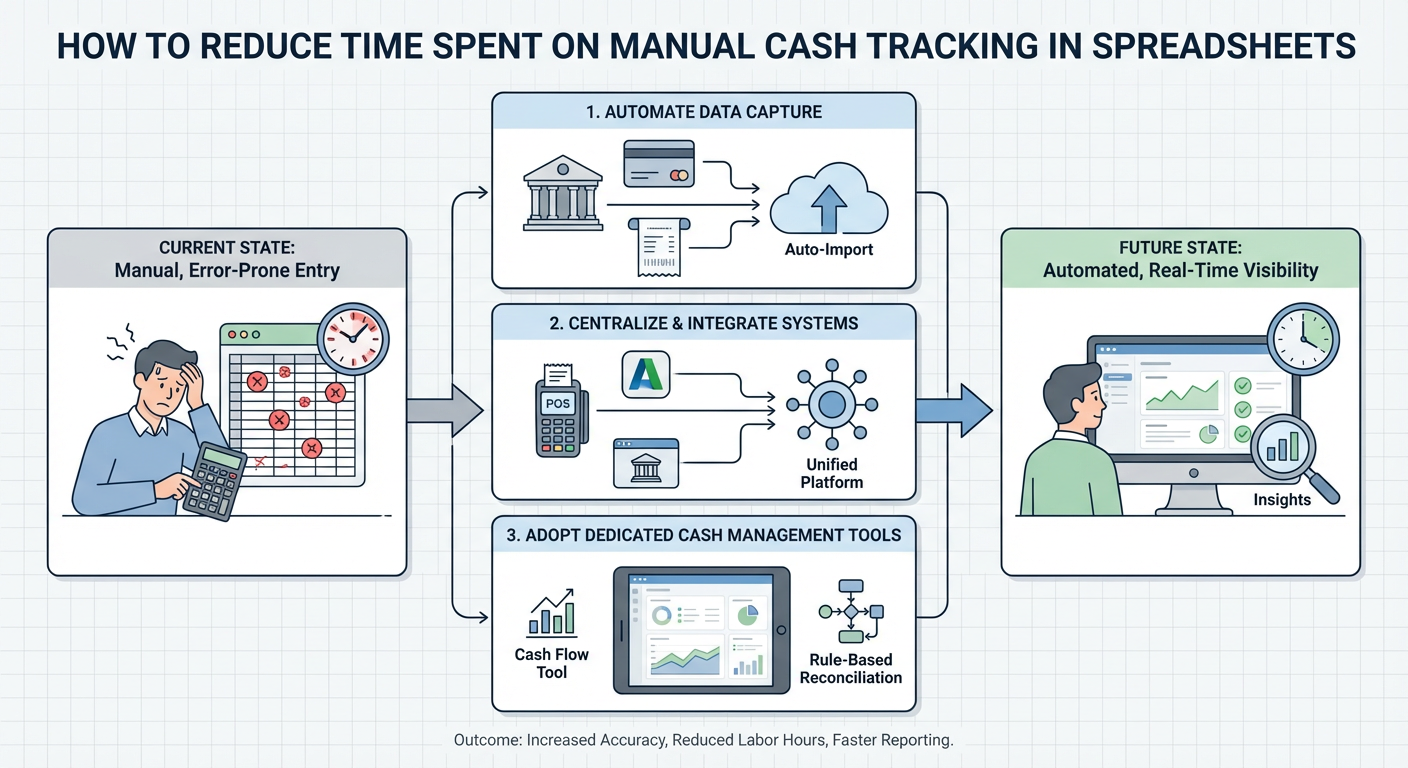
- Manual spreadsheet tracking is time-consuming because of data entry, formula maintenance, and reconciliation errors
- Standardizing your spreadsheet structure is the fastest free win you can make today
- Automation tools and integrations can eliminate most repetitive data entry
- Clear naming conventions and version control prevent hours of confusion
- Dedicated cash management software is worth evaluating once your volume grows
Why Manual Cash Tracking Eats So Much Time
Most of the time lost in spreadsheet-based cash tracking comes from a handful of recurring problems.
Repeated manual data entry. Someone has to pull numbers from bank statements, invoices, or accounting systems and type them in. This takes time and introduces errors.
Formula fragility. Spreadsheets break. Someone edits a cell, drags a formula incorrectly, or deletes a row, and suddenly the totals are wrong. Tracking down the issue can take longer than the original entry.
Version confusion. When multiple people work on the same file, you end up with "CashTracker_Final_v3_REAL.xlsx" situations that waste time and create reconciliation headaches.
No audit trail. Spreadsheets do not automatically log who changed what and when. When something looks off, you have to investigate manually.
Understanding where the time goes is the first step to getting it back.
Step 1: Standardize Your Spreadsheet Structure
Before adding any tools or automation, get your foundation right. A well-structured spreadsheet is faster to update, easier to audit, and less likely to break.
Use a consistent layout across all sheets:
- One row per transaction
- Fixed column headers that never change
- Separate tabs for raw data, summaries, and reconciliation
- No merged cells (they break formulas and sorting)
Lock your formula cells. Use sheet protection to prevent accidental edits to cells that contain formulas. Only data entry cells should be editable.
Create a data validation layer. Use dropdown menus for categories, account names, and transaction types. This prevents typos and keeps your data clean for filtering and reporting.
A standardized structure alone can cut reconciliation time by 30 to 40 percent because you spend less time hunting for errors.
Step 2: Use Templates Instead of Building from Scratch
Every time someone creates a new monthly sheet by copying last month's file, they risk carrying over errors or breaking something. Use a locked master template instead.
- Store the template in a shared location with clear naming
- Protect the structure so users can only fill in designated fields
- Include instructions directly in the sheet using comments or a separate "How to Use" tab
This sounds simple, but it eliminates a surprising amount of rework.
Step 3: Automate Data Import
Manual data entry is the biggest time sink in cash tracking. The goal is to get data flowing into your spreadsheet automatically rather than typing it in.
For Google Sheets users:
- Use Google Sheets' built-in import functions like `IMPORTDATA` or `IMPORTRANGE` to pull data from other sheets or sources
- Connect to your bank or accounting software using tools like Zapier, Make (formerly Integromat), or n8n
- Use Google Apps Script to automate repetitive tasks like pulling in a daily balance
For Excel users:
- Power Query is one of the most powerful tools available for automating data imports
- Connect directly to CSV exports from your bank or accounting system and refresh with one click
- Use Excel macros for repetitive formatting or calculation tasks
What you can automate with these tools:
- Pulling daily or weekly bank balances
- Importing transaction data from accounting software
- Generating summary reports from raw data
- Sending alerts when balances fall below a threshold
Even automating one or two of these tasks can save several hours per week.
Step 4: Implement Version Control
Version confusion is a silent time killer. Here is a simple system that works without any special software.
- Keep one "live" file with a clear, permanent name
- Use a changelog tab inside the file to log major updates
- If you need to archive versions, use a consistent naming convention like YYYY-MM-DD at the start of the filename
- Store files in a shared cloud location (Google Drive, SharePoint, OneDrive) so there is only ever one source of truth
If your team uses Google Sheets, version history is built in. You can see every change and restore previous versions without any extra setup.
Step 5: Build a Reconciliation Checklist
Reconciliation is where most manual time gets lost. A structured checklist turns an open-ended task into a repeatable process.
Your reconciliation checklist should include:
- Confirm opening balance matches prior period closing balance
- Verify all transactions are entered and categorized
- Cross-check totals against bank statement
- Flag any unmatched items for follow-up
- Sign off with initials and date
When reconciliation follows a checklist, it takes a predictable amount of time and is less likely to require rework.
When to Consider Moving Beyond Spreadsheets
Spreadsheets work well up to a point. Once your cash tracking needs grow, the manual overhead can outpace any efficiency gains from optimization.
| Situation | Spreadsheet Still Works | Time to Evaluate Software |
|---|---|---|
| Single bank account | Yes | No |
| Multiple accounts or entities | Possible with effort | Yes |
| Daily reconciliation needed | Difficult | Yes |
| Multiple team members updating | Risky | Yes |
| Audit trail required | No | Yes |
| Real-time cash visibility needed | No | Yes |
If you are checking two or more boxes in the right column, it is worth evaluating dedicated cash management or treasury tools. Options range from lightweight tools like Float or Pulse to more robust treasury management systems depending on your business size.
Quick Wins You Can Implement Today
If you want to start reducing time immediately, here are the actions with the fastest payoff:
1. Lock your formula cells to prevent accidental edits
2. Add data validation dropdowns to your category and account columns
3. Set up Power Query or IMPORTRANGE to pull in at least one data source automatically
4. Create a master template and delete the old copy-and-paste habit
5. Add a changelog tab to your main tracking file
None of these require budget or new software. They just require about an hour of setup time.
Conclusion
Manual cash tracking in spreadsheets does not have to be as painful as it often becomes. The biggest time losses come from inconsistent structure, manual data entry, version confusion, and unstructured reconciliation. Each of these has a practical fix.
Start with structure and templates, then layer in automation where you can. If your needs grow beyond what spreadsheets can handle efficiently, use the comparison table above to decide when it makes sense to evaluate dedicated tools.
The goal is not a perfect system on day one. It is a system that gets a little faster and more reliable each month until cash tracking becomes a background task instead of a weekly ordeal.



