


Small business accounting shouldn’t only make sense at tax time. A clean Chart of Accounts makes bookkeeping faster, reports clearer, and mistakes easier to catch.
Quick Take (Key Takeaways)
- Build a lean Chart of Accounts (COA) around five categories: Assets, Liabilities, Equity, Income, Expenses.
- Keep it tight. 20–60 total accounts covers most freelancers and small businesses.
- Start with a software template: QuickBooks COA (https://quickbooks.intuit.com/learn-support/en-us/help-article/chart-accounts/); Xero COA (https://central.xero.com/s/article/Chart-of-accounts-overview).
- Design accounts for tax reporting, decision-making, and consistent coding. Not perfection.
- Add basic controls early: Owner’s Draw/Distributions, Sales Tax Payable, and Undeposited Funds or a Stripe/PayPal Clearing account (if applicable).
Why your Chart of Accounts matters (even if you hate bookkeeping)
If you’ve looked at your Profit & Loss and thought, “None of this matches how I run the business,” the Chart of Accounts is usually the problem.
A COA is just the list of buckets your transactions go into. Every invoice, bill, payroll run, bank fee, and subscription ends up in one bucket. If the buckets are sloppy, your reports are useless.
A good COA helps you:
1. See where money comes from and where it goes
2. Keep coding consistent month to month
3. Make tax time less chaotic
A bad COA does the opposite. It hides what’s really happening, encourages random coding, and turns “reporting” into a cleanup job.
This guide shows you how to build a simple COA that works for most small businesses and freelancers: service providers, agencies, consultants, ecommerce brands, and local businesses. Plain-English categories. Real examples. No overengineering.
Start with the “five buckets” and choose simplicity on purpose
A COA works best when it lines up with your core financial statements and doesn’t try to track every tiny detail.
Every Chart of Accounts is built from five categories:
- Assets (what you own): cash, bank accounts, receivables, equipment
- Liabilities (what you owe): credit cards, loans, taxes payable
- Equity (owner’s stake): contributions, draws/distributions, retained earnings
- Income (what you earn): sales, service revenue, other income
- Expenses (what you spend): rent, software, advertising, contractors
The most common mistake is creating too many accounts too early. Stuff like “Advertising – Facebook – Prospecting – Q1 Campaign” or a separate expense account for every app. It feels organized. It usually isn’t. Too many choices leads to inconsistent coding, which kills your reporting.
Practical targets:
- Service business / freelancer: ~20–40 accounts
- Small ecommerce / product business: ~35–60 accounts
- Multi-location / complex operations: may need more, but start lean
When you’re deciding what belongs in your COA, use questions that tie to real work:
- What do I review every month? (marketing, payroll, contractor costs)
- What will my CPA ask for? (owner draws, sales tax, depreciation)
- What changes decisions? (COGS vs operating expenses, shipping costs, payroll vs contractors)
Simple is not “less professional.” Simple is maintainable.
Pick your “core accounts” (with a copy-and-use template)
If your core accounts are solid, most bookkeeping becomes repeatable. You stop debating where things “should” go and start closing the month.
Below is a starter set. You don’t need every line. Use what matches your business.
Assets (common)
- Checking Account
- Savings Account (optional)
- Accounts Receivable (A/R) (if you invoice clients)
- Undeposited Funds (useful for cash/checks and some processor workflows)
- Stripe/PayPal Clearing (optional; useful when payouts don’t match sales timing)
- Inventory (product businesses)
- Prepaid Expenses (optional; annual insurance, retainers, etc.)
- Fixed Assets – Equipment (computers, machinery)
- Accumulated Depreciation (often handled by your CPA; optional in DIY books)
Liabilities (common)
- Credit Card Payable
- Accounts Payable (A/P) (if you track bills)
- Sales Tax Payable (if you collect sales tax/VAT/GST)
- Payroll Liabilities (if you run payroll yourself)
- Loan Payable (term loans, SBA loans)
- Line of Credit Payable (if applicable)
Equity (common)
- Owner’s Equity / Capital
- Owner Contributions (money you put in)
- Owner Draw / Distributions (money you take out)
- Retained Earnings (system-generated in many tools)
Income (common)
- Sales / Service Revenue
- Product Sales (if you sell products)
- Shipping Income (optional; only if you charge separately)
- Other Income (rare; keep this small and specific)
Cost of Goods Sold (COGS) (if you sell products or have direct delivery costs)
- Inventory Purchases / Cost of Goods Sold
- Merchant Processing Fees (common for ecommerce; pick one approach and stick with it)
- Shipping & Fulfillment (postage, 3PL, packaging)
- Subcontractors – Direct (COGS) (contractors tied to delivering what you sold)
Expenses (common)
- Advertising & Marketing
- Bank Fees
- Insurance
- Legal & Professional Fees (CPA, attorney)
- Office Supplies
- Rent / Coworking
- Software & Subscriptions
- Telephone & Internet
- Travel
- Meals (Business) (separate for deductibility rules)
- Utilities (if applicable)
- Wages / Payroll (if you have employees)
- Subcontractors – Operating (admin help, non-delivery contractors)
Practical scenario:
- If you’re a freelance designer, you might only need Service Revenue, Software & Subscriptions, Advertising & Marketing, Contractors, and a tax liability account if required.
- If you run Shopify, you’ll likely add Inventory, COGS, Shipping & Fulfillment, and Merchant Processing Fees.
Use account naming and numbering to stay organized (without overengineering)
The “best” naming convention is the one you’ll use consistently. Keep it scannable and predictable.
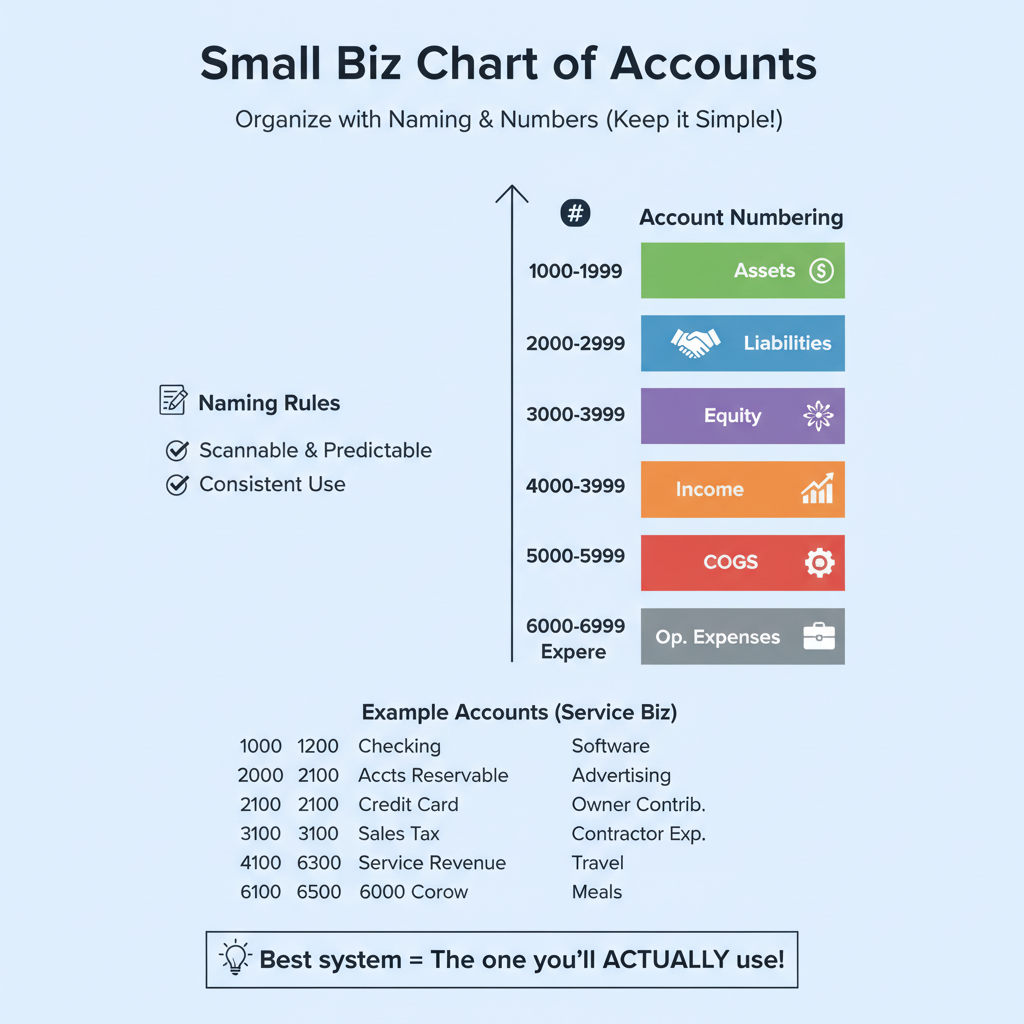
You don’t need account numbers, but they help with sorting and future growth. A simple system:
- 1000–1999 Assets
- 2000–2999 Liabilities
- 3000–3999 Equity
- 4000–4999 Income
- 5000–5999 COGS
- 6000–6999 Operating Expenses
Example (service business):
- 1000 Checking
- 1200 Accounts Receivable
- 2000 Credit Card Payable
- 2100 Sales Tax Payable
- 3100 Owner Contributions
- 3200 Owner Draw
- 4000 Service Revenue
- 6100 Software & Subscriptions
- 6200 Advertising & Marketing
- 6300 Contractor Expense
- 6400 Travel
- 6500 Meals (Business)
Naming rules that prevent a mess later:
- Pick one level of detail. Use “Advertising & Marketing,” not a dozen sub-accounts.
- Don’t keep “Misc Expense” long-term. Use it temporarily, then reclass during month-end.
- Make a call on common gray areas and apply it every time:
- Put “Merchant Fees” in COGS (common for ecommerce) or Bank Fees (common for service). Pick one.
- Split contractors into Direct (COGS) vs Operating only if it changes how you measure margins.
- Decide whether “Home Office” lives as an expense line or gets handled by your CPA. Many freelancers keep it off the books and let the CPA calculate it.
A quick filter: if an account is consistently under 1–2% of monthly expenses and doesn’t change decisions, it probably doesn’t need its own line.
Map real transactions to the right accounts (with examples you can steal)
A COA only works if it makes everyday coding obvious. The goal is fewer judgment calls.
Common transactions and where they typically go:
Income examples
- Client invoice paid via ACH → Service Revenue
- Shopify orders → Product Sales
- Refunds → as contra income (some software uses “Sales Returns”) or as negative sales, depending on your setup
Asset and liability examples
- Customer hasn’t paid yet → Accounts Receivable increases
- You buy a laptop for $1,800 → often Fixed Assets – Equipment (ask your CPA; some businesses expense it)
- You collect sales tax on an invoice → Sales Tax Payable (liability), not income
- Stripe pays out $9,700, but gross sales were $10,000 → use Stripe Clearing so fees and timing reconcile cleanly
Expense vs COGS examples
For a marketing agency:
- Contractor paid to deliver client work → Subcontractors – Direct (COGS)
- Virtual assistant or admin help → Subcontractors – Operating
- Canva, Adobe, Notion → Software & Subscriptions
For ecommerce:
- Product purchase from supplier → Inventory (asset), then moves to COGS when sold (method depends on your accounting approach)
- Shipping labels → Shipping & Fulfillment (COGS)
- Influencer campaign → Advertising & Marketing
A constant trouble spot is meals, travel, and auto expenses. Keep them separate because tax treatment varies. Clean categories give your CPA what they need without digging.
If you want consistency, make a one-page “coding cheat sheet” with your top 20 transaction types and the right account for each. Use it yourself. Hand it to a bookkeeper. Either way, it stops category creep.
Set it up in your accounting software and build guardrails for month-end
Setting up a COA is the easy part. The win is making accurate monthly reporting routine.
Most tools let you start from a template and customize. Two solid references:
- QuickBooks Chart of Accounts help: https://quickbooks.intuit.com/learn-support/en-us/help-article/chart-accounts/
- Xero Chart of Accounts overview: https://central.xero.com/s/article/Chart-of-accounts-overview
A setup process that works:
1. Start from the closest template, then deactivate what you won’t use. (Deactivate is safer than delete once transactions exist.)
2. Create the core accounts first: bank, A/R, credit card, sales tax payable, revenue, and your top expense categories. Skip the “nice-to-haves” for now.
3. Turn on bank feeds and rules to cut manual work:
- Recurring subscriptions → Software & Subscriptions
- Ad platforms → Advertising & Marketing
- Payment processors → Merchant Fees (or whatever category you chose)
- If you’re not using bank feeds (or you’re cleaning up historical periods), it can help to convert statements into structured transactions first. For example, tools like ReceiptsAI’s credit card statement extractor can turn a PDF statement into Excel/CSV and exportable transaction data for bookkeeping workflows: https://receiptsai.com/tools/credit-card-statement-extractor
4. Do a monthly close, even if it’s just you:
- Reconcile bank and credit cards
- Clear Uncategorized/Misc and reclass
- Review A/R and A/P for obvious issues
- Check Sales Tax Payable looks reasonable (if applicable)
Guardrails that prevent the usual mess:
- Code personal spending to Owner Draw/Distributions, not business expense categories
- Keep Sales Tax Payable separate so you don’t spend tax money by accident
- If processor payouts don’t match sales, use a clearing account (Stripe/PayPal) instead of forcing bad reconciliations
A simple COA plus monthly reconciliation beats a complex COA you can’t keep up with.
Conclusion: a simple COA makes better decisions (and easier taxes)
A simple Chart of Accounts is one of the highest-leverage finance setups you can do. When your accounts are clean and consistent, your Profit & Loss becomes something you can actually use. Not a report you avoid until your CPA asks for it.
Keep your COA lean, build around the five buckets, and add detail only when it changes how you manage the business.
Next steps:
- Pick your core accounts (use the template above) and set them up in your software.
- Add bank rules and reconcile monthly.
- Use these resources to speed setup: QuickBooks COA help (https://quickbooks.intuit.com/learn-support/en-us/help-article/chart-accounts/) and Xero COA overview (https://central.xero.com/s/article/Chart-of-accounts-overview).
If you only fix four things this week, fix these: revenue, contractors/COGS, software, and taxes payable. That’s where clarity shows up fast.



