


Running a small business means wearing many hats. Financial oversight often gets pushed to the back burner until tax season arrives or cash flow becomes a problem. A monthly expense review changes that pattern. By dedicating just 30 minutes each month to reviewing your spending, you can catch problems early, spot savings opportunities, and make smarter decisions with your money.
This article walks you through a simple, repeatable routine that any small business owner can follow, regardless of accounting experience.
Key Takeaways
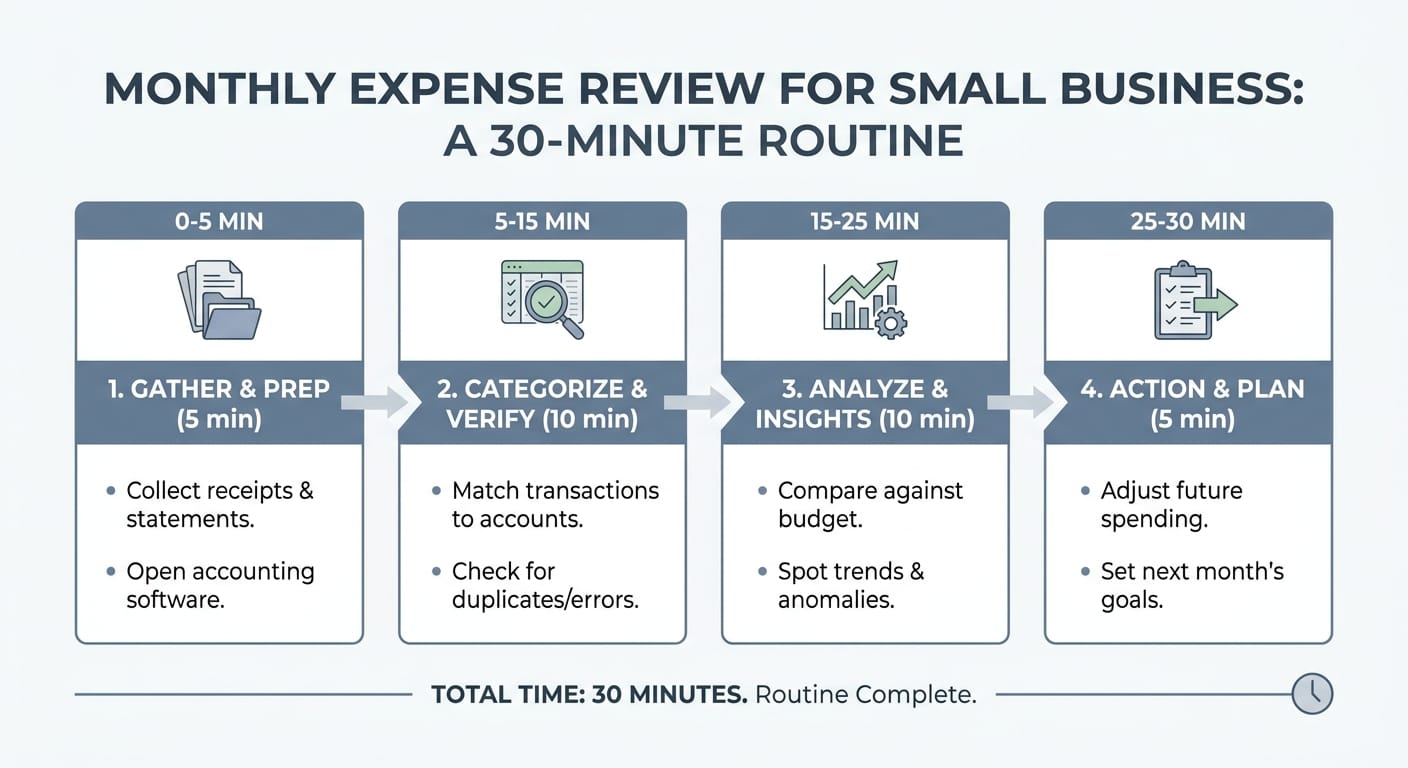
- A 30-minute monthly review is enough to stay on top of business expenses
- You need just three tools: your bank statements, accounting software or spreadsheet, and a simple checklist
- The goal is to categorize, compare, and question your spending every month
- Catching one unnecessary subscription or vendor overcharge can save hundreds annually
- Consistency matters more than perfection
Why Monthly Expense Reviews Matter
Many small business owners only look at their finances when something goes wrong. That reactive approach is costly. By the time you notice a cash flow problem, it has usually been building for weeks or months.
A monthly review keeps you in the driver's seat. Here is what a consistent routine helps you do:
- Catch duplicate charges or billing errors before they stack up
- Identify subscriptions or services you no longer use
- Compare actual spending to your budget
- Spot seasonal patterns in your costs
- Prepare accurate data for tax deductions
The 30-minute timeframe is intentional. Short enough to actually do it. Long enough to be meaningful.
What You Need Before You Start
Preparation takes less than five minutes if you keep things organized. Before your monthly session, gather the following:
- Bank and credit card statements for the past month
- Your accounting software (QuickBooks, Wave, FreshBooks, or similar) or a simple spreadsheet
- Last month's expense summary for comparison
- A quiet 30 minutes with no interruptions
If you use accounting software that automatically imports transactions, most of the data will already be waiting for you. If you work from spreadsheets, export your bank transactions to a CSV file first.
The 30-Minute Routine, Step by Step
Minutes 1 to 5: Categorize Uncategorized Transactions
Start by making sure every transaction from the past month has a category. Common categories include:
- Rent and utilities
- Payroll and contractor payments
- Software and subscriptions
- Marketing and advertising
- Office supplies and equipment
- Professional services (legal, accounting)
- Travel and meals
- Inventory or cost of goods sold
If you use accounting software, this step is mostly reviewing auto-categorized items and fixing any that landed in the wrong bucket. If you use a spreadsheet, sort transactions by vendor and assign categories manually.
Tip: Create a consistent category list and stick to it. Changing categories month to month makes comparisons impossible.
Minutes 6 to 12: Compare This Month to Last Month
Once everything is categorized, pull up a simple side-by-side view of this month versus last month. You are looking for anything that stands out.
| Category | Last Month | This Month | Change |
|---|---|---|---|
| Software and Subscriptions | $320 | $475 | +$155 |
| Marketing | $800 | $800 | $0 |
| Office Supplies | $90 | $210 | +$120 |
| Utilities | $180 | $175 | -$5 |
Ask yourself these questions as you scan:
- Which categories increased significantly?
- Were those increases expected or surprising?
- Did any category drop to zero? (Could mean a missed payment or a canceled service you forgot about)
- Are there any vendors you do not recognize?
Flag anything that needs a closer look. You do not need to resolve every question right now. Just note it.
Minutes 13 to 18: Review Subscriptions and Recurring Charges
Subscriptions are the silent budget killers for small businesses. They renew automatically, often with price increases, and they accumulate over time.
During this window, go through every recurring charge and ask:
- Is this still being used? If you cannot name a specific use case, it is probably not worth keeping.
- Has the price changed? Many SaaS tools raise prices annually. Check if you are paying more than you expected.
- Is there a cheaper alternative? If you have been on a plan for a year or more, a better option may now exist.
- Are you on the right tier? You may be paying for features you do not use.
Even canceling two or three unused tools can free up $50 to $200 per month. That adds up to $600 to $2,400 per year.
Minutes 19 to 24: Check Against Your Budget
If you have a monthly budget, now is the time to compare actuals to targets. If you do not have a budget yet, this step becomes about setting one.
Look at each major category and note:
- Over budget: What caused the overage? Was it a one-time event or a pattern?
- Under budget: Is this good news, or did you delay a necessary expense?
- On track: Note what is working so you can replicate it.
You do not need a complex budget. Even a simple list of expected monthly costs by category gives you a benchmark to measure against.
Minutes 25 to 28: Flag Action Items
By now, you have a clear picture of your spending. Use these final minutes to write down any action items. Keep the list short and specific.
Examples of good action items:
- Cancel the project management tool we stopped using in March
- Call the internet provider to ask about the $40 price increase
- Move the design software to an annual plan to save 20 percent
- Ask the accountant if the home office expense was categorized correctly
Limit yourself to three to five action items. A shorter list gets done. A longer list gets ignored.
Minutes 29 to 30: Save and Schedule Next Review
Save your expense summary and notes in a consistent location. A shared folder, your accounting software, or even a dedicated notebook all work fine.
Then, before you close everything out, schedule next month's review on your calendar. Treat it like a client meeting. Give it a fixed time, ideally the same day each month, such as the first Monday or the last Friday.
Common Mistakes to Avoid
Even with a solid routine, a few habits can undermine your results:
- Skipping months and trying to catch up: Two months of transactions doubles the time and confusion. Monthly is the right cadence.
- Reviewing without comparing: A single month of data tells you little. Context comes from comparison.
- Ignoring small charges: A $9 charge might seem trivial, but 10 of them add up to $1,080 per year.
- Not following through on action items: The review is only valuable if it leads to decisions.
Tools That Make This Easier
| Tool Type | Best For | Examples |
|---|---|---|
| Accounting Software | Automatic categorization and reporting | QuickBooks, Wave, FreshBooks |
| Spreadsheets | Full control, low cost | Google Sheets, Excel |
| Expense Tracking Apps | Receipt capture and categorization | Expensify, [Ramp](https://ramp.com/enterprise/), [Brex](https://www.brex.com/pricing) |
| Bank Dashboards | Quick transaction overview | Most business bank accounts |
Choose the tool that matches your current setup. The best tool is the one you will actually use consistently.
Conclusion
A monthly expense review does not require an accounting degree or hours of your time. It requires 30 minutes, a consistent routine, and the discipline to show up every month.
Start this month. Pull up your statements, spend 30 minutes working through the steps above, and write down your action items. Do it again next month. Within three months, you will have a clear picture of where your money is going and real opportunities to improve.
Small businesses that stay close to their numbers make better decisions. This routine is how you stay close.



