


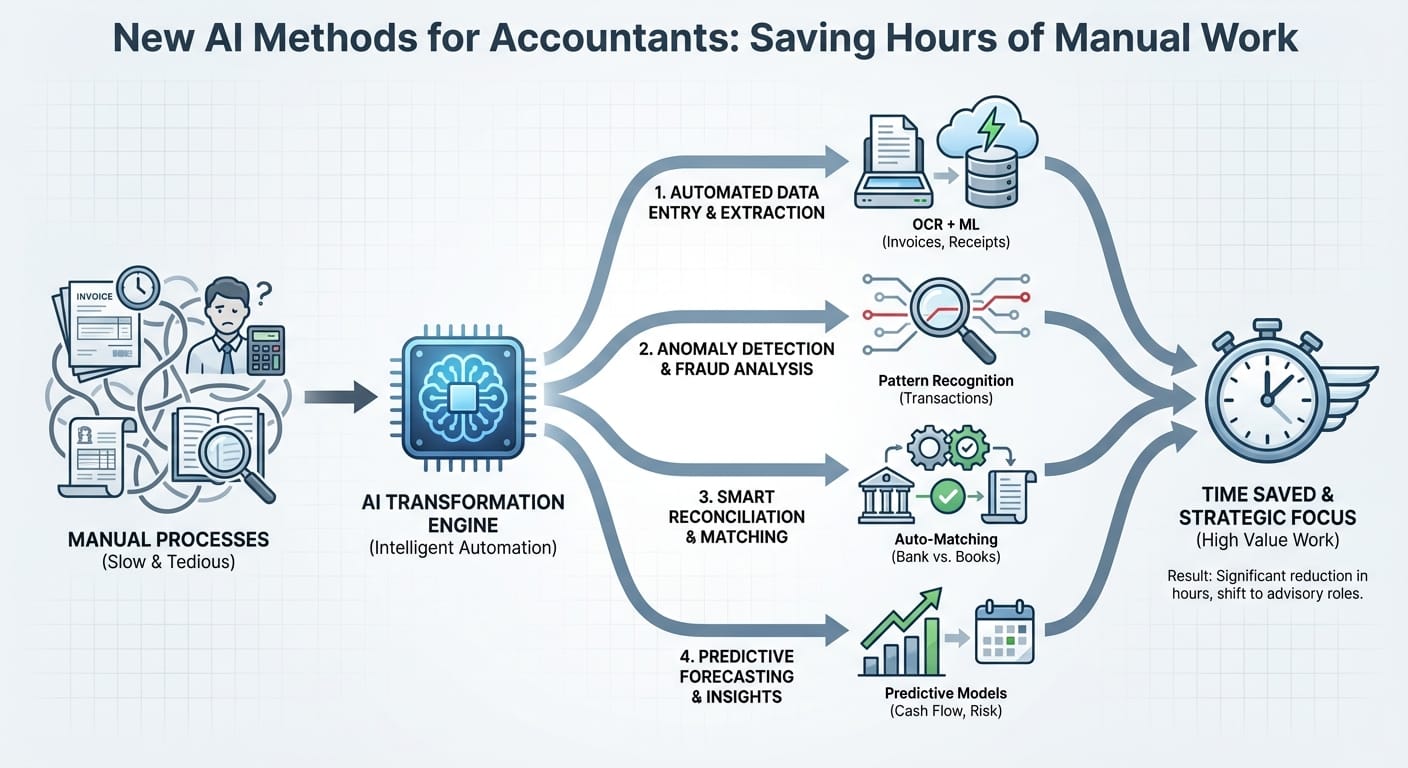
Accounting teams have plenty of technical skill. What they often lack is time. Many days get consumed by repeatable work: collecting documents, cleaning exports, matching transactions, drafting similar emails, and reconciling line by line. Used carefully, AI can reduce that workload without removing control or auditability—especially when it’s applied to well-defined workflows and kept under review.
This article covers practical, low-risk ways firms are using AI right now, where it tends to perform reliably, and how to roll it out with basic checks and documentation.
Key takeaways
- Start with document intake, coding suggestions, and variance explanations. These are fast wins with manageable risk.
- Use AI as a first pass, not the final approver. AI proposes. Accountants decide.
- The biggest time savings come from workflow + prompts + templates, not premium pricing.
- Pick tools that support audit trails, role-based access, and retention controls.
- Track results with simple metrics: minutes saved per close task, exception rate, and rework.
Where AI saves the most time in modern accounting
AI does best with high-volume, pattern-based work—especially where humans are doing “copy/paste plus judgment.” The biggest savings usually show up in:
- AP/AR document processing (invoices, bills, receipts)
- Transaction categorization and reconciliation
- Month-end close support (tie-outs, variance notes, flux analysis drafts)
- Client communications (requests, follow-ups, explanations)
- Spreadsheet cleanup and transformation
- Policy and working paper drafting (templates, memos, summaries)
If you spend a few hours a week on any of the above, you likely have an AI opportunity.
Method 1: AI-powered document intake (from inbox to coded transactions)
One of the most straightforward wins is turning inbound documents into structured data. Modern extraction tools can read invoices, receipts, W-9s, and bank statements and output:
- Vendor name, date, totals, tax
- Line items (when needed)
- PO numbers, terms, and payment details
- Confidence scores and flagged fields
For teams that handle a lot of receipts specifically, tools such as ReceiptsAI (https://receiptsai.com/) focus on getting receipt data into a usable, reviewable format—helpful when the bottleneck is “collect → read → key in → code.”
Where it saves time
- Cuts manual data entry
- Reduces back-and-forth on missing fields
- Standardizes vendor names and formats
How to implement (safe + practical)
- Set the rule: AI extracts, humans approve
- Use confidence thresholds (for example, only auto-post above 95%)
- Build a missing-info workflow (AI drafts the email to the vendor/client)
Quick workflow example
1. Document arrives (email, upload, mobile scan)
2. AI extracts fields and suggests GL coding
3. Accountant reviews exceptions only
4. Approved items sync to the GL/AP system
5. Source document and metadata are stored for the audit trail
Method 2: Smart transaction coding with “suggestion + explanation”
Rules-based coding breaks down when vendors change names, clients mix personal and business spend, or categories are ambiguous. Newer AI approaches use context signals such as:
- Merchant/vendor history
- Descriptions and memo fields
- Amount patterns (recurring vs one-off)
- Department/class/location tendencies
- Prior approvals for similar transactions
Best practice: require a reason
Do not accept “because the model said so.” Require a one-line explanation with each suggestion, for example:
- “Coded to Meals & Entertainment because vendor matches prior entries, memo includes ‘restaurant,’ and amount is within the usual range.”
That small addition speeds review and makes the process easier to defend later.
Guardrails to add
- Force manual approval for sensitive categories (for example: owner draws, payroll, loan accounts)
- Maintain a do-not-auto-code vendor list
- Track corrections and feed them back to improve suggestions
Method 3: AI reconciliation that focuses you on exceptions
AI-assisted reconciliation doesn’t change reconciliation standards. It changes where you spend attention. Instead of scanning everything, you review the items that do not match cleanly.
What AI does well here
- Suggests matches between bank feeds and the GL using fuzzy criteria (date windows, partial memo matches)
- Detects duplicates and near-duplicates
- Flags anomalies (unusual amount, odd timing, new vendor)
What still needs human judgment
- Timing differences and accrual decisions
- Transfers between related entities
- One-off payments, reversals, and corrections
- Classification and policy compliance
A simple “exception-first” close checklist
- Auto-match transactions with strong confidence
- Review the unmatched list sorted by:
- Highest dollar value
- Oldest items
- New vendors
- Require notes for overrides so the file tells its own story later
Method 4: Variance explanations and flux analysis drafting
Variance explanations take time because the work is half thinking and half writing. You may already know the story, but you still have to draft it clearly, in the same format, every month.
AI can produce first-draft narratives such as:
- Month-over-month change summaries
- Budget vs actual commentary
- Key drivers based on account groupings
- Follow-up questions when the drivers are unclear
How to keep it accurate
Do not ask for a narrative from a blank prompt. Feed structured inputs:
- A table of account changes
- Thresholds (for example: “explain anything > $10k or > 15%”)
- Known context (new hires, price changes, campaign start dates)
- Required format (bullets, 3 to 5 sentences, include next steps)
Output you actually want
- Commentary you can edit in minutes
- A short list of “questions to resolve” (for example: “Was this vendor prepaid or expensed?”)
- A checklist of supporting schedules needed
Method 5: Spreadsheet cleanup, mapping, and transformation
A lot of accounting time disappears in spreadsheets: cleaning bank exports, mapping trial balances, reshaping data for pivots, fixing inconsistent vendor names, and rebuilding the same roll-forward templates.
AI helps in two practical ways:
1. Natural-language instructions for transformations (especially when paired with spreadsheet automation tools)
2. Pattern detection for mapping and standardization
High-value use cases
- Mapping a client’s COA to your reporting structure
- Standardizing vendor names (for example: “AMZN MKTP,” “Amazon,” “Amazon Marketplace”)
- Building month-end roll-forward templates
- Creating pivot-ready datasets from messy exports
Practical tip
Keep a versioned “mapping dictionary” you control. Let AI propose mappings, then lock the final table like you would any other controlled schedule.
Method 6: AI-generated client emails, follow-ups, and meeting notes
Client communication is repetitive and context-dependent, which makes it a good AI target.
Time-saving tasks
- Drafting monthly close requests (“please send missing statements…”)
- Payment reminders for AR
- Explaining accounting treatment in plain English
- Summarizing meetings into action items
- Generating onboarding checklists
A reliable pattern: templates + variables
Instead of “write an email,” use a template prompt with variables:
- Purpose: Missing documents for close
- Tone: Professional, brief
- Variables: Client name, missing items, deadline, upload link
- Compliance: Avoid tax/legal advice language if you are not engaged to give it
This keeps messages consistent and reduces rewrites.
Choosing AI approaches: a comparison table
Match the method to the risk level and the controls you need.
| AI method | Time saved potential | Risk level | Best for | Recommended control |
|---|---|---|---|---|
| Document extraction (invoices/receipts) | High | Low–Medium | AP-heavy teams | Confidence thresholds + human approval |
| Transaction coding suggestions | High | Medium | Bookkeeping + GL coding | Restricted categories + feedback loop |
| Exception-first reconciliation | Medium–High | Medium | Month-end close | Audit notes for overrides + match rules |
| Variance/flux narrative drafting | Medium | Low | Controllers/FP&A-aligned accounting | Structured inputs + edit before use |
| Spreadsheet mapping/cleanup | Medium | Medium | Multi-client firms | Versioned mapping tables + spot checks |
| Client emails/notes automation | Medium | Low | CAS and public accounting | Templates + approval workflow |
Pick one or two initiatives that are high-impact and easy to control. That’s usually the fastest path to adoption.
Implementation playbook: get results in 2–4 weeks
Most AI rollouts fail because they sprawl. Keep the scope tight, make it measurable, and put governance in from day one.
Step 1: Pick one workflow and define “done”
Good first workflows:
- Receipt/invoice capture → coded draft → approval (often a fit for receipt-focused tools like ReceiptsAI if receipts are your highest-volume document type)
- Bank reconciliation with an exception-first queue
- Variance explanation drafting for the top 15 accounts
Define success with simple metrics:
- Minutes saved per close
- % of transactions auto-coded and approved
- Exception rate (items needing human correction)
Step 2: Build a “human-in-the-loop” review lane
- AI produces a draft plus a confidence score
- A reviewer approves or edits
- Corrections are logged so you can tighten the workflow over time
Step 3: Create prompt + template standards
For narrative work (emails, memos, explanations), standardize:
- Required inputs (tables, context bullets)
- Output format (bullets, sections, length)
- Disallowed content (speculation, unsupported claims)
Step 4: Add governance basics
- Limit access by role (client confidentiality)
- Define what data can and cannot be sent to external tools
- Align retention policies with firm/company requirements
- Keep an audit trail: inputs, outputs, approvals, exceptions
Common pitfalls (and how to avoid them)
- Over-automating judgment calls
Keep policy-heavy areas (revenue recognition, reserves, complex accruals) in manual review.
- Not tracking exceptions
If you do not measure corrections, you cannot reduce them. Exceptions are your improvement list.
- Garbage inputs
AI will not rescue a broken process. Standardize naming, intake, and the chart of accounts first.
- Tool sprawl
One or two integrated tools beat a stack of disconnected subscriptions.
Conclusion: practical next steps
If you want hours back quickly, focus on AI methods that reduce manual handling of documents, transactions, reconciliations, and repetitive writing—while keeping approvals and audit support in human hands. Start with one workflow, measure it, and tighten controls as you learn.
Next steps for this week:
1. List the top 3 monthly time sinks by hours spent.
2. Choose one workflow to pilot with a clear target (for example: cut bank rec time by 30%).
3. Run an exception-first review process and require short explanations for AI suggestions.
4. Standardize templates and keep a simple log of overrides and corrections.
Do this for a month and you should see measurable time savings, along with a workflow that’s easier to maintain as volume increases.



