


When receipts live in wallets, inboxes, and glove compartments, your books turn into guesswork. A straightforward receipt processing strategy keeps expenses documented, deductions supported, and month-end close more predictable.
This guide lays out a practical workflow to capture, review, and reconcile receipts without turning bookkeeping into a second job.
Key takeaways
- Use one capture system with two inputs: mobile scan and email forwarding.
- Standardize what you record: date, vendor, amount, category, payment method, business purpose.
- Review weekly to catch errors before they snowball.
- Reconcile by matching receipt → transaction → account, then fix exceptions immediately.
- Automate repetitive steps (OCR, rules, auto-matching) where it makes sense, and keep a human check for policy and accuracy.
Why receipt processing is worth fixing (even if you’re “small”)
Receipts are how you support what you spent and why. If they’re missing or unclear, you’ll spend extra time chasing details, risk missing deductions, and end up making decisions from incomplete numbers.
A solid receipt process supports:
- Accurate categorization for reporting and budgeting
- Tax support for deductions (with documentation)
- Cash flow visibility by vendor and category
- Fraud and error detection (duplicates, wrong card use)
- Faster close with fewer open questions
You don’t need perfection—you need a consistent routine you can rely on.
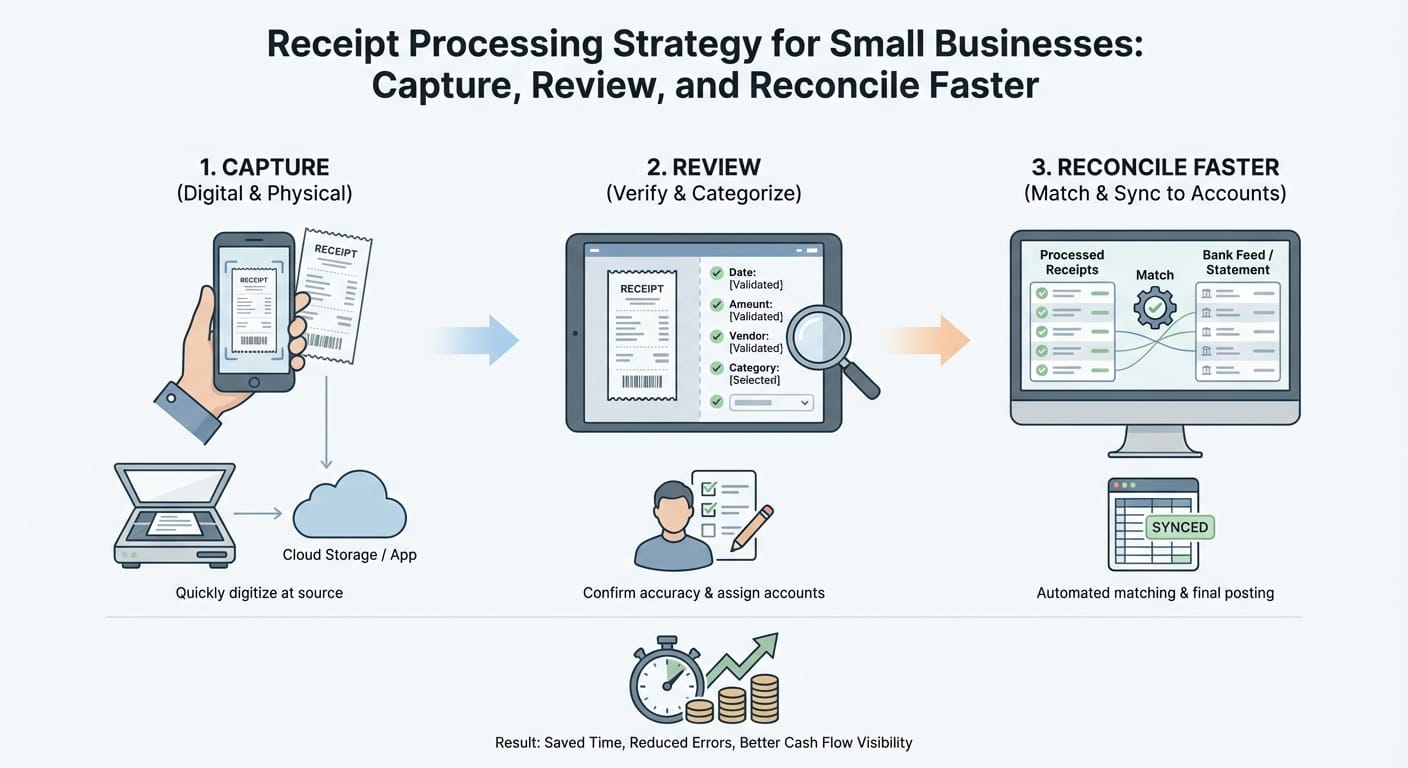
The three-step workflow: Capture → Review → Reconcile
A fast process has three stages, each with a clear finish line:
1. Capture: Every receipt lands in one system quickly (same day or within 48 hours).
2. Review: Receipts get checked for completeness and policy issues (weekly).
3. Reconcile: Receipts get matched to bank/credit transactions and posted correctly (weekly, plus month-end).
Capture alone just creates a bigger backlog. Month-end-only reconciliation guarantees a missing receipt chase. Speed comes from small, regular work.
Step 1: Capture receipts fast (and stop losing them)
Choose your capture sources (keep it to 2–3 max)
Most small businesses only need:
- Mobile scan/photo for paper receipts
- Email forwarding rule for digital receipts (invoices, ride-share, SaaS)
Optional third channel:
- Vendor portals (Amazon, Apple, etc.), but only if it’s a major spend category
Rule: if capture takes more than 15 seconds, it won’t stick.
If you want a single place to send both scans and forwarded emails, a receipt tool such as ReceiptsAI (https://receiptsai.com/) can centralize intake and reduce the “where did that receipt go?” problem—without changing your underlying workflow.
Define what “captured” means
A receipt is captured when it includes:
- A legible image/PDF
- Vendor name
- Date
- Total amount (and tax/tip if relevant)
- Payment method (or last 4 digits if available)
- Business purpose (short note)
Add the business purpose at capture time. If you wait, you’ll forget.
Make capture effortless with simple policies
Policies should remove debate:
- Same-day capture for cash and meals
- 48-hour capture for everything else
- No reimbursement without a receipt, unless your exception rule says otherwise
- One company card per person where possible (matching becomes far easier)
Paper receipt handling (yes, it still matters)
For paper receipts:
- Photograph immediately
- Store in a labeled monthly envelope only if you need originals
- Shred once your retention policy allows and you have a backed-up digital copy
Retention rules vary. Confirm your requirements with your accountant.
Step 2: Review receipts weekly (catch issues before they compound)
Weekly review keeps small problems from becoming month-end cleanup.
What to check in a weekly review
Use a short checklist:
- Legibility: Can you read vendor and total?
- Completeness: Missing date, tip, tax, currency?
- Business purpose: Specific enough (example: “Client lunch. Acme renewal discussion.”)
- Category fit: Meals vs. travel vs. supplies, etc.
- Duplicates: Same vendor/amount twice (common with email + scan)
- Policy compliance: limits, approvals, restricted categories
If you’re using a system with OCR and a searchable archive (including tools like ReceiptsAI), the review step is often faster because you can filter for “missing fields” or quickly search by vendor/amount when something looks off.
Decide who does what (owner vs. staff vs. bookkeeper)
Clear roles prevent bottlenecks:
- Employees/staff: capture + business purpose note
- Owner/manager: approve exceptions and high-dollar items
- Bookkeeper/accountant: consistent coding, posting, reconciliation
If you’re solo, block 20–30 minutes weekly and run the checklist.
Step 3: Reconcile quickly by matching receipts to transactions
Reconciliation is where documentation becomes clean accounting.
The matching hierarchy (use this order)
1. Exact match: amount + vendor + date window
2. Near match: amount matches, vendor name varies (example: “SQ *Cafe”)
3. Split match: one receipt needs multiple categories (supplies + equipment)
4. Multiple receipts, one transaction: consolidated invoices or grouped purchases
Build a clear exception workflow
Exceptions are what slow teams down. Define what happens when things don’t line up.
- No receipt found
- Request from employee or vendor
- If under a threshold, allow a “missing receipt affidavit” (if you want this policy)
- Otherwise mark as non-reimbursable or owner draw, per your rules
- Receipt doesn’t match transaction
- Check tips, pre-auths (hotels, gas stations), partial refunds
- Verify currency conversion for travel
- Confirm whether it was personal or business spend
- Duplicate transactions or duplicate receipts
- Confirm whether one is pending
- Void duplicates or exclude them in bookkeeping
Don’t wait for month-end
Do a light reconcile weekly:
- Match what’s available
- Flag exceptions immediately
- Leave a small list for month-end
Month-end should be review and final checks, not digging through old emails.
Tools and workflows: what to use (and what to avoid)
You can do this with discipline and a spreadsheet, but many businesses benefit from automation. The point of a tool is fewer steps, not more software.
Comparison: common receipt processing setups
| Setup | Best for | Pros | Cons | Typical workflow speed |
|---|---|---|---|---|
| Manual spreadsheet + folder of photos | Very early-stage, low volume | Free, simple | Easy to lose receipts, hard to audit, slow matching | Slowest |
| Accounting software + bank feeds (no receipt tool) | Low volume, disciplined owners | Fewer tools | Receipts still scattered, weak documentation | Medium |
| Receipt capture app + accounting integration | Most small businesses | OCR, centralized storage, easier matching | Subscription cost, still needs review | Fast |
| Corporate cards with built-in receipt capture | Teams with frequent spend | Auto-link transactions, policy controls | Less flexible, may require switching providers | Fastest for teams |
Features that actually speed things up
Prioritize:
- One-tap mobile capture
- Email-in address for automatic forwarding
- OCR for vendor/date/total
- Auto-matching to bank/card transactions
- Light approvals (if you have a team)
- Sync/export to your accounting system
- Searchable archive by vendor/date/amount
Skip feature-heavy tools your team won’t use. Adoption beats capability. If you’re evaluating options, compare them on how well they support your two main inputs (scan + email) and how easily you can retrieve documentation later (ReceiptsAI is one example of a tool designed around that kind of centralized capture).
Standardize categories and rules (so coding becomes automatic)
Most receipt issues come from inconsistent categorization. If every transaction needs a new decision, you’ll always be behind.
Start with a “small business” chart of accounts mindset
You don’t need dozens of categories. You need a short list you’ll actually use consistently:
- Advertising & marketing
- Software subscriptions
- Office supplies
- Travel (airfare, lodging)
- Meals & entertainment (if applicable)
- Professional services
- Shipping/postage
- Repairs & maintenance
Add rules that reduce questions
Examples:
- Coffee meetings go to Meals with a purpose note
- SaaS under $X/month goes to Software
- Electronics under your capitalization threshold go to Supplies/Equipment (confirm with your accountant)
- Client gifts get a separate category and require a recipient note (if needed for compliance)
Put these rules in a one-page policy. Then mirror them in your tool’s auto-categorization settings.
Build a weekly and monthly cadence (the “close faster” rhythm)
A process only works if it survives busy weeks. Cadence is what keeps it alive.
Weekly (30–60 minutes)
- Confirm new receipts are captured with a purpose note
- Approve/reject exceptions
- Match receipts to transactions
- Request missing items immediately
Monthly (60–120 minutes)
- Reconcile bank/credit accounts to statement balances
- Clear uncategorized/uncleared transactions
- Check for duplicates and unused subscriptions
- Confirm large purchases are categorized correctly
- Share a clean package with your accountant (if applicable)
Weekly discipline is what makes month-end easier.
Common pitfalls (and how to prevent them)
- Pitfall: Saving everything for tax time
Fix: weekly review + monthly reconciliation. Put it on the calendar.
- Pitfall: Too many capture channels
Fix: mobile + email forwarding. Add more only if you have a real reason.
- Pitfall: No business purpose
Fix: require a note at capture time. Keep it short and specific.
- Pitfall: Mixing personal and business spend
Fix: separate cards/accounts. Define how mistakes get reimbursed or reclassified.
- Pitfall: Letting exceptions pile up
Fix: resolve exceptions within 7 days. Escalate or write off per policy.
Conclusion: your next steps to capture, review, and reconcile faster
You don’t need a complicated tech stack. You need a workflow you’ll follow: one capture system, a weekly review, and regular reconciliation.
Do this next week:
1. Pick your two capture channels (mobile scan + email forwarding).
2. Write a one-page receipt policy (requirements, deadlines, exceptions).
3. Schedule a recurring 30-minute weekly receipt review.
4. Track exceptions (missing receipts, mismatches, duplicates) and clear them weekly.
5. At month-end, reconcile accounts and close the period.
If you decide to streamline capture and retrieval, choose a system that keeps receipts in one place and supports your existing routine—whether that’s a basic shared inbox and folder structure or a dedicated tool like ReceiptsAI (https://receiptsai.com/). Once receipts stop being a recurring fire drill, your books become usable again.



