


Missing receipts aren’t a minor bookkeeping nuisance. They cost you money in lost deductions, slow reconciliations, and hours of cleanup you end up doing at night or on weekends.
Quick Take (Key Takeaways)
- Set one non-negotiable rule: capture every expense at the moment of purchase (photo or forward). Not later.
- Standardize your stack: one capture tool (e.g., Expensify, Dext, QuickBooks Online receipts, Xero + Hubdoc, or ReceiptsAI) plus a shared email like [email protected].
- Use a simple naming and category standard so receipts turn into usable data, not a junk drawer of images.
- Drive compliance with light automation: card prompts, reminders, and a weekly “receipt sweep.”
- Measure it: track receipt match rate and follow up within 48 hours while people still remember what they bought.
---
Why Receipts Keep Slipping Through the Cracks (and What It Costs You)
Most freelancers and small business owners don’t lose receipts because they’re sloppy. Receipts slip because the workflow is fragile.
They show up as paper, email, text, vendor portals, and in-app downloads. You’re usually buying things on the move. And nothing bad happens when you skip the receipt. Not today. The pain shows up weeks later during reconciliation, when you’re trying to remember what that $46.18 charge was and the vendor portal wants you to reset your password for the third time.
This article is about building a receipt habit: a repeatable system that makes capturing expenses automatic for you and anyone who spends for the business. The goal is simple: fewer missing receipts, cleaner books, faster closes. You don’t need perfection. You need a process that holds up during your busiest week.
---
Build a One-Rule System: “Capture at the Moment of Purchase”
Receipt compliance improves fast when there’s only one rule: capture immediately, every time.
Most systems fail because they rely on future you: “I’ll upload it later,” “I’ll forward it tonight,” “I’ll keep it in my wallet.” That’s just stacking failure points.
Set one rule that applies to every purchase:
- Paper receipt: take a photo before you leave the counter (or the parking lot, worst case).
- Digital receipt: forward it the moment it hits your inbox.
- App/portal receipt: screenshot or download the PDF immediately, then send it to your receipt inbox.
Now define “capture” so there’s no wiggle room. Capture does *not* mean “it’s in my camera roll” or “I left it unread in email.” Capture means it lands in your designated system (receipt app upload or the receipts inbox) where it’s searchable and part of the bookkeeping flow.
Example: you buy supplies at Staples. While they’re ringing you up, you open the app and snap the receipt. It gets cropped, stored, and tagged with date and total. Done. If you shove it in your pocket, you’ve turned a five-second task into a future scavenger hunt.
Write the rule down. Put it where people will see it: pinned in Slack/Teams, in onboarding docs, and in your card policy. Habits stick when the standard is clear and repeated.
---
Choose a Simple “Receipt Stack” (Tools + One Shared Inbox)
This only works if your tools reduce friction. One capture method. One place receipts go. One route into your books.
You don’t need a fancy setup. You need consistency. Pick a stack that matches your accounting platform and how many people spend money.
Option A: Receipt app + accounting integration (most common)
- Expensify, Dext, Ramp, Brex, or Zoho Expense (capture, rules, approvals)
- Integrate with QuickBooks Online or Xero
Option B: Accounting software’s native receipt capture
- QuickBooks Online: mobile receipt capture and matching
- Xero + Hubdoc: centralized capture and document storage
Option C: A dedicated AI inbox for receipts and statements
- Tools like ReceiptsAI focus on extracting data from receipts, invoices, and even bank statements, so the “capture” step turns into usable bookkeeping inputs faster (instead of a folder full of images). If you’re evaluating tools, pay attention to whether the interface is simple enough that people actually use it—and whether the provider’s privacy posture matches your needs.
Non-negotiable addition: a shared receipt email
- Create [email protected]
- Let employees forward from their work email
- Add auto-forward rules for common vendor emails (Amazon, Apple, Google, etc.)
Then set default routes for repeat vendors so receipts flow in without anyone thinking about it:
- Amazon → auto-forward order confirmations/invoices to receipts@
- SaaS tools (Notion, Adobe, Google Workspace) → forward billing emails to receipts@
- Travel (Uber, Lyft, airlines, hotels) → email rules to forward automatically
Two small details matter more than people expect:
1. Home screen placement: put the capture app on the first screen. If it’s buried, it won’t get used.
2. Email shortcut: create a contact named “Receipts” so forwarding is two taps.
If you’re solo, keep it lean: QuickBooks receipt capture + receipts@ and a weekly 15-minute review. If you have a team, pick something with approvals and automated reminders so you’re not chasing receipts manually.
---
Design a 30-Second Workflow Anyone Can Follow (With Examples)
If this takes more than 30 seconds per expense, it won’t survive real life.
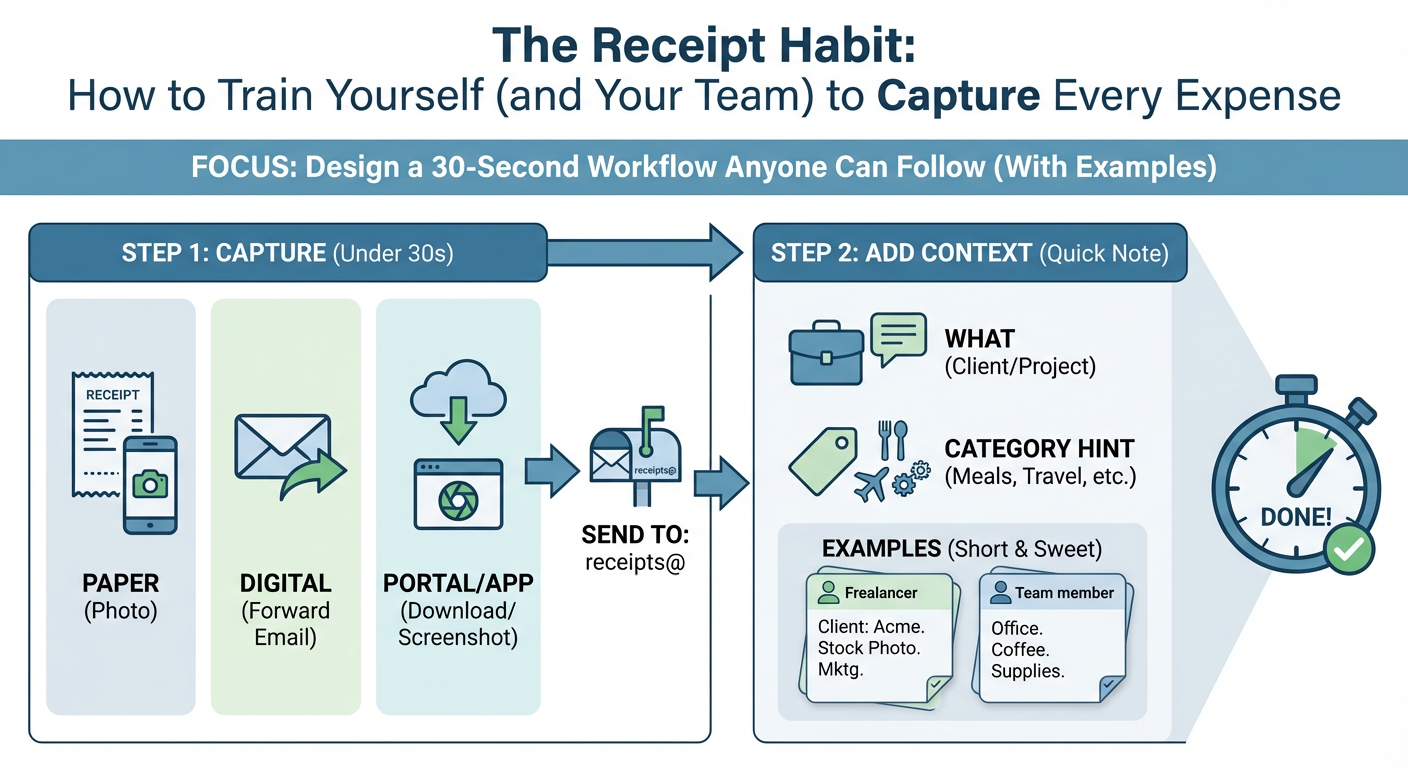
Here’s a workflow that works for solo owners and teams.
Step 1: Capture
- Paper: photo in the capture app (or email the photo to receipts@)
- Digital: forward the email to receipts@
- Portal/app: download PDF or screenshot, then send to receipts@
Step 2: Add two pieces of context
Teach people to add:
- What it was for (client, project, or purpose)
- Category hint (meals, travel, software, supplies)
Most apps support a note field. If you’re forwarding by email, add one line at the top.
Example (freelancer):
“Client: Acme website redesign. Stock photo license. Advertising/Marketing.”
Example (team member):
“Office snacks for Friday meeting. Meals/Team.”
Step 3: Match to payment method
Receipts matter most when they tie cleanly to how you paid:
- Company card transactions should have a receipt within a few days
- Reimbursements should require receipt + context before approval
- Cash expenses should be rare (and captured immediately)
Step 4: Weekly sweep + exception handling
Once a week, do a 10–15 minute sweep:
- Unmatched transactions older than 7 days
- Missing receipts flagged by the tool
- Duplicates or unreadable images
Also decide what happens when reality gets messy:
- If a vendor can’t provide a receipt, require a note with date, amount, and business purpose.
- If someone loses a receipt, require a simple “missing receipt declaration” (form or email template) and limit how often it’s allowed.
This workflow works because it doesn’t rely on memory. It relies on a tiny, repeatable action.
---
Turn Receipt Capture Into a Team Culture (Without Micromanaging)
Team compliance comes from clarity, low effort, and fast feedback. Not guilt trips and Slack nagging.
If more than one person spends money, you need a policy that’s easy to follow and actually enforced. Start with three basics.
1) Write a one-page expense policy
Include:
- What’s allowed (and limits)
- Which payment methods are permitted (company card preferred)
- The receipt rule: capture immediately
- Submission deadline (e.g., within 48 hours)
- What happens if receipts are missing (reimbursement delayed, card privileges paused)
Keep it short. If it takes longer than five minutes to read, nobody will.
2) Make it part of onboarding
In week one, show new hires:
- Which app you use
- How to forward to receipts@
- What a “good” receipt looks like (notes, category hints)
- How approvals and reimbursements work
Ten minutes upfront saves months of back-and-forth.
3) Use guardrails instead of chasing people
If you issue company cards, use tools that support:
- Real-time transaction notifications that prompt receipt upload
- Auto-reminders after 24–48 hours
- Merchant/category rules (Uber → Travel)
- Approvals before reimbursements are paid
Scenario: your designer buys a plugin. Their card app pings them to upload the receipt. They forward the email receipt, add “Client: Beacon. Website build,” and move on. No follow-up from you.
For contractors, tie reimbursement processing to compliance: receipts and context first, reimbursement second. That’s not harsh. It’s basic operations.
---
Make It Stick: Metrics, Rituals, and Automation That Reduce Errors
If you measure and review it weekly, it improves. If you ignore it, it turns into a monthly cleanup mess.
Treat receipt capture like any other internal system: define what “good” means, check it regularly, and tighten it over time.
Track two simple metrics
- Receipt match rate: % of card transactions with a receipt attached within 7 days
Target: 90%+ for small teams. 95%+ if you run a tight ship.
- Time to capture: average days between transaction and receipt upload
Target: 0–2 days.
Most expense tools and accounting platforms show unmatched transactions. If yours doesn’t, export weekly and check the list.
Add two lightweight rituals
- Weekly Receipt Sweep (10–15 minutes): clear unmatched transactions, request missing receipts, remove duplicates.
- Month-End Clean Close (30–60 minutes): confirm the month’s receipts are in, handle edge cases, archive.
Automate the boring parts
- Email rules to auto-forward vendor receipts to receipts@
- Merchant rules to pre-categorize common vendors (Adobe → Software)
- Auto-reminders for missing receipts at 24/48 hours
- Default project/client tags where it makes sense
Reduce receipt friction in the real world
- Keep a small envelope in the glove box for the rare paper receipt. Still photograph it.
- Ask for digital receipts at checkout when possible.
- Prefer company cards over reimbursements. People comply more when the system prompts them at the moment of purchase.
The point isn’t more process. It’s fewer loose ends.
---
Conclusion: Make Receipts Boring, and Your Books Get Easier
Receipts only become a problem when you treat them like an afterthought. Capture immediately, route everything to one place, and review weekly. That’s it. For solo owners, this means cleaner books and fewer missed deductions. For teams, it means fewer reimbursement fights, faster closes, and clearer cash flow.
Your next steps:
- Pick your stack (e.g., Expensify, Dext, QuickBooks Online receipt capture, Xero + Hubdoc, or ReceiptsAI) and set up [email protected].
- Publish the standard: capture at the moment of purchase.
- Put a 15-minute weekly sweep on the calendar and track your receipt match rate.
Do this for 30 days and the question “Where’s the receipt?” mostly disappears, because the system stops letting receipts wander off in the first place.



