

An expense report is an organized list of business-related purchases you need to get paid back for or claim on your taxes, and a complete one should include six critical data fields: purchase cost, purchase date, purchase description, expense category, user account, and subtotal by category. If you're staring at a shoebox of receipts, a cluttered email folder, or a stack of card charges you barely remember, this is the system that turns that mess into something usable.
Maybe you bought printer ink for a client project, paid for parking on the way to a meeting, grabbed lunch while traveling for work, and renewed a software subscription you use for your business. None of those costs feel complicated in the moment. A few months later, they blur together.
That's where an expense report helps. In simple terms, it's a clean record of what you spent, when you spent it, why it was for the business, and what proof you have. For freelancers and small business owners, that matters even more because you often don't have a manager, finance team, or corporate policy catching mistakes before tax time.
Your Guide to Taming Business Spending
A lot of people first ask what is an expense report when they're already behind.
They're not curious in an abstract way. They're trying to make sense of a pile of receipts from a backpack pocket, screenshots of digital purchases, and card transactions labeled with vendor names they no longer recognize. They know the money went out. They're just not sure how to prove what it was for.
An expense report solves that problem by taking scattered spending and turning it into an organized record. It's the practical answer to the dreaded shoebox of receipts. Instead of trusting your memory, you create a document that shows each business purchase clearly enough that you, your bookkeeper, or a tax reviewer can understand it later.
What it means in plain language
Think of an expense report as a list with backup.
It lists each business expense, groups it into a category, and ties it to supporting proof like a receipt. If you paid out of pocket, it helps you reimburse yourself or an employee properly. If you're a freelancer, it helps you support tax deductions and keep cleaner books.
A basic example might include:
- A coffee meeting: Date, vendor, amount, category, and a note about which client or prospect you met
- Office supplies: What was purchased, the total cost, and the receipt
- Travel costs: Parking, lodging, or transportation, with a short explanation of the business reason
- Software or online services: The vendor name, date charged, and what the subscription supports in your work
Practical rule: If you'd struggle to explain the purchase six months from now, your expense report needs a better description today.
Why freelancers need a slightly different mindset
Most expense report advice is written for employees inside larger companies. In that world, someone else usually sets the rules, approves the report, and handles reimbursement.
Freelancers and very small businesses don't work that way. You often have to build the habit yourself. That means your report can't just say what you bought. It should also show the business purpose clearly enough to stand on its own later.
That's the fundamental value of learning this early. Once you understand the logic behind expense reports, they stop feeling like paperwork and start feeling like protection.
Why Expense Reports Matter for Your Business
You buy software for a client project, pay for parking at a meeting, and grab supplies on the way home. A month later, you remember the charges, but not the details. That is when small expenses start turning into fuzzy records.

An expense report gives those purchases a paper trail while the facts are still clear. If you want a dictionary-style explanation of what counts as an expense, that page is a useful companion. For everyday bookkeeping, the bigger question is simpler: what problem does the report solve for your business?
It solves three.
A report helps you get money back when someone paid out of pocket. It gives you support for deductions if the IRS or your tax preparer asks questions later. It also helps you spot spending patterns before they subtly eat into profit.
Job one is reimbursement
This is the easiest one to see.
If an employee or contractor pays for a business purchase with personal funds, the expense report shows what was spent, when it happened, and why the business should repay it. Without that record, reimbursement turns into guesswork.
For freelancers and owner-operators, reimbursement often means paying yourself back from the business correctly or billing an agreed expense to a client. The report acts like a receipt with context. It does not just show the amount. It shows why the amount belongs to the business in the first place.
Job two is tax support
Many small business owners get caught off guard concerning this.
A bank feed can show that you spent $48. It usually cannot explain whether that charge was office supplies, client lunch, parking for a job site, or something personal mixed in by mistake. An expense report fills in that missing sentence.
That matters during tax season, and it matters even more during an audit. Good records let you show the business purpose of a purchase without relying on memory. If you are a freelancer without an accounting department, that protection has to come from your own habits.
An expense report is the written explanation that ties the charge to the work.
Job three is clearer decisions
Expense reports also help you run the business, not just record it.
When you review them regularly, you start seeing patterns that are easy to miss in a checking account or credit card statement. Maybe one client requires more travel than your pricing covers. Maybe subscriptions have piled up. Maybe small supply runs are happening so often that it would be cheaper to buy in batches.
That kind of visibility helps with pricing, budgeting, and cash flow. For a very small business, those decisions often rest on thin margins. Clear expense reporting gives you cleaner numbers, and cleaner numbers make better decisions possible.
A useful report answers three plain-language questions:
- What did you spend
- Why was it for the business
- How should it be recorded or repaid
If you can answer those quickly, your books stay cleaner, your deductions are easier to defend, and your business is easier to manage.
Anatomy of an Expense Report What to Include
Say you look at a charge from three weeks ago for $68. You remember spending it for work, but that is about it. Was it parking and tolls for a client visit, printer ink, or a meal you should not deduct the same way? An expense report solves that problem by turning a blurry memory into a clear record.
For a freelancer or small business owner, that is the primary job of the report. It is not paperwork for its own sake. It is a file that lets you prove what happened, why it belonged to the business, and where it should go in your books if anyone asks later.
A useful expense report usually has six parts.
| Field | What It Is | Why It Matters |
|---|---|---|
| Purchase cost | The full amount paid | Records the amount to reimburse or book |
| Purchase date | The date the expense happened | Places it in the right period |
| Purchase description | What you bought | Identifies the item or service |
| Expense category | How the expense should be grouped | Keeps bookkeeping organized |
| Person, client, or project | Who or what the expense relates to | Shows where the cost belongs |
| Receipt or supporting document | Proof of the purchase | Backs up the entry if questions come up |
Those six pieces work together. If one is missing, the report gets weaker. A date without a receipt leaves you with a claim but no proof. A receipt without a business purpose leaves you with proof of spending, but not proof that the spending was business-related.
The fields that do the heavy lifting
Purchase cost should match what you paid. Include taxes, fees, tips, or shipping when those are part of the business expense.
Purchase date is more important than it looks. It helps you place the transaction in the correct month, quarter, or tax year. It also gives you a quick way to match the line item to the receipt and to the charge on your card or bank statement.
Purchase description is where many beginner reports break down. A vague note like "supplies" or "meal" forces future you to guess. A better description is specific enough that the story makes sense later, such as "notebooks and pens for client workshop" or "lunch with web design client during project planning meeting."
Expense category tells your bookkeeping system how to treat the purchase. Categories are the labeled folders of your records. If travel, software, meals, and office supplies all get tossed into one pile, your books may still add up, but they stop being useful.
Person, client, or project may sound like a big-company field, but small businesses need it too. If you bought materials for Client A, drove to a job site, or paid for a subscription used only for one line of work, note that. This is one of the easiest ways to keep client profitability and project costs from getting muddy.
Receipt or supporting document closes the loop. The report says what happened. The receipt helps prove it happened.
What a good line item looks like
Here is a simple way to judge an entry. Could a stranger read it six months from now and understand it without calling you?
Compare these:
- Weak: $24.50, lunch
- Better: $24.50, lunch with prospective client before proposal meeting, categorized as meals
- Weak: $89, supplies
- Better: $89, printer ink and mailing envelopes for monthly client invoices, categorized as office supplies
That extra detail is not overkill. It is what turns a list of charges into records you can defend.
Receipts are part of the report
Many freelancers treat receipts like a separate pile to deal with later. That is how details get lost.
Attach the receipt to each expense entry, or store it in a way that clearly connects it to that line. The amount, date, and vendor should match. If the receipt says one thing and the report says another, you have created a question you will have to answer later.
For each expense, keep:
- A readable receipt or invoice
- The exact date of purchase
- The vendor name
- A short business purpose note
- The category you will use in your books
If a purchase has a mixed use, say so. For example, if you bought a phone or internet plan used partly for business and partly for personal life, note the business portion you are claiming. Small-business expense reports often get into trouble not because the owner spent money incorrectly, but because the record does not explain the situation clearly enough.
A strong expense report lets your books hold up even without a finance department behind them. That is the standard to aim for.
From Purchase to Payout The Reporting Lifecycle
The common idea is that the expense report begins when a spreadsheet is opened. It starts earlier than that. It starts when the money is spent.
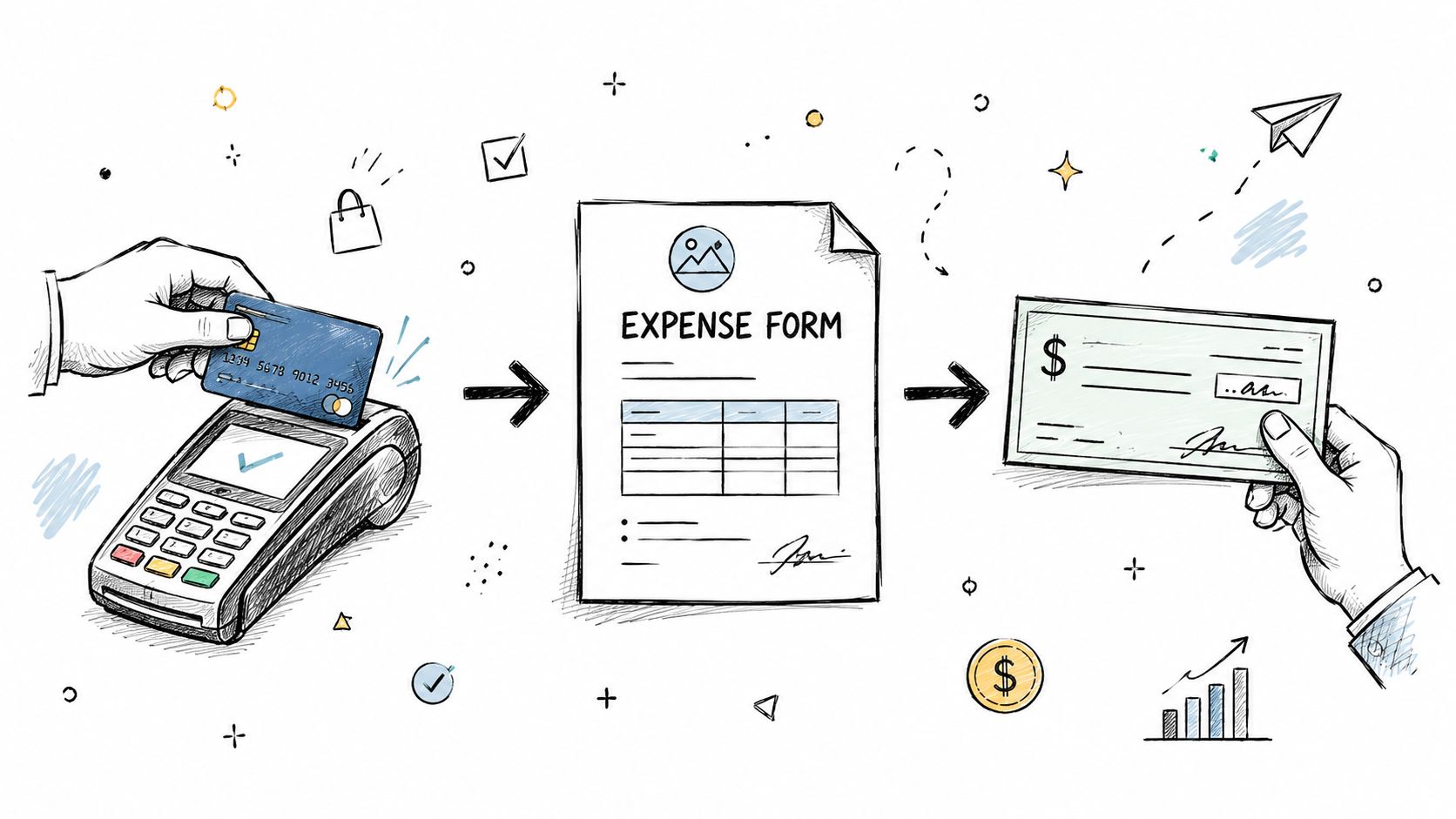
If you use software to support this workflow, BookkeepDIY's Expensify page shows the kind of features many expense tools offer. Even if you stay manual for now, the workflow itself stays mostly the same.
Step one is capture the expense right away
The cleanest reports come from fast capture.
As soon as you make a business purchase, save the receipt and write down what it was for while it's fresh. If you wait until month-end, details start to fade. That's when descriptions become vague and receipts go missing.
A freelancer might do this by keeping a digital folder for the month and naming each receipt clearly. A small team might ask employees to upload receipts as purchases happen.
Step two is compile the report
At the end of your reporting period, pull those purchases into one report.
For each line, include the core details, attach the receipt, and place the expense in the right category. The report can cover a month, a trip, a project, or another consistent period that makes sense for your business.
A simple report often works best when it follows this order:
- List each expense individually
- Add the business purpose for each one
- Assign a category
- Attach supporting receipts
- Check subtotals before submission or recording
Step three is review and approval
In a company, this usually means a manager reviews the report for policy compliance before finance processes it.
If you're a freelancer, you still need a review step, even if you're reviewing your own work. That means checking whether the receipt matches the amount, whether the category makes sense, and whether the business reason is specific enough.
Review your own report like a skeptical outsider would. If an entry looks unclear, fix it before you file it away.
Step four is reimbursement or recording
Once approved, the expense reaches its final destination.
For employees, that usually means reimbursement through payroll, check, or another payment method. For a solo owner, it may mean recording the expense in the books, reimbursing yourself properly, or saving the report as support for tax records.
The process sounds formal because it is. But it doesn't need to be complicated. One purchase, one receipt, one explanation, one line in the report. Repeated consistently, that becomes a reliable system.
Common Mistakes to Avoid on Expense Reports
You buy a train ticket for a client meeting, grab lunch between appointments, and pick up printer ink on the way home. A month later, you sit down to file everything and realize the charges still look familiar, but the reasons behind them are already fuzzy.
That is how weak expense reports happen.
For freelancers and small business owners, the problem usually is not dishonesty. It is missing context. You know the purchase was for work, but your report has to prove that to someone who was not there. If a tax reviewer, bookkeeper, or even your future self looks at that line item six months later, the entry should still make sense on its own.
The most common mistake is writing what you bought, not why you bought it
This trips up a lot of self-employed people because the purchase feels obvious in the moment.
But “lunch,” “software,” or “office supplies” is only half the story. An expense report works like a label on a storage box. If the label is vague, you have to open the box and guess. If the label is clear, you know exactly what is inside and why it belongs there.
Here's what that looks like in practice:
- Weak note: Lunch
- Better note: Lunch during client travel day
- Best note: Lunch during travel to on-site client workshop for project delivery
The stronger version explains the business purpose, not just the item purchased. That is the part many freelancers forget.
Small mistakes create big cleanup work later
A report can fall apart in quiet ways. One missing receipt may not seem serious today. Three months later, paired with a vague note and the wrong category, it becomes hard to defend and even harder to remember.
Common trouble spots include:
- Lost receipts: Without proof, you are relying on memory
- Late reporting: Details fade fast, especially for routine purchases
- Wrong categories: Bad categories can distort your books and make tax prep messier
- Personal and business charges mixed together: Even legitimate business spending looks weaker when it sits beside personal purchases
- Using a template made for employees: Freelancers often need details those forms leave out, such as client, project, and whether the cost was billable
Freelancers need a little more context than employees do
An employee often has backup around the expense. There may be a manager, a company policy, a corporate card statement, or a reimbursement workflow. A freelancer usually does not.
That means your expense report has to carry more of the explanation by itself.
A stronger freelancer-friendly report often includes:
- Client name
- Project or job
- Clear business reason
- Expense category
- Whether the cost is billable or absorbed by the business
- Receipt attached to the same entry
Those extra fields are not overkill. They are the difference between “I know this was for work” and “I can show why this was for work.”
A simple self-check can catch most problems
Before you file a report, read each line like a skeptical outsider.
Ask:
- Would someone else understand why this was a business expense?
- Is the receipt attached and readable?
- Does the category match what was purchased?
- If this expense were questioned next year, would this entry still hold up?
If the answer is no, add one more sentence now. That minute of cleanup is much easier than trying to rebuild the story later.
You do not need a finance department to create audit-ready records. You need a habit that is clear, consistent, and detailed enough to explain each purchase without guesswork.
Streamlining Reports with Expense Management Tools
You buy parking for a client meeting, grab supplies on the way home, and tell yourself you will sort it out later. Three weeks later, the receipt is crumpled, the charge on your bank feed is vague, and you are trying to remember which client the cost belonged to.
That is the point where a tool can help.
Manual reports are fine when your business is small and your spending is simple. But once receipts start living in your car, your inbox, and your pockets, the process gets harder to trust. The problem is not just speed. It is memory. A good expense system helps you capture the story of the purchase while it is still fresh, which is exactly what freelancers and small business owners need if they ever have to defend that expense at tax time.
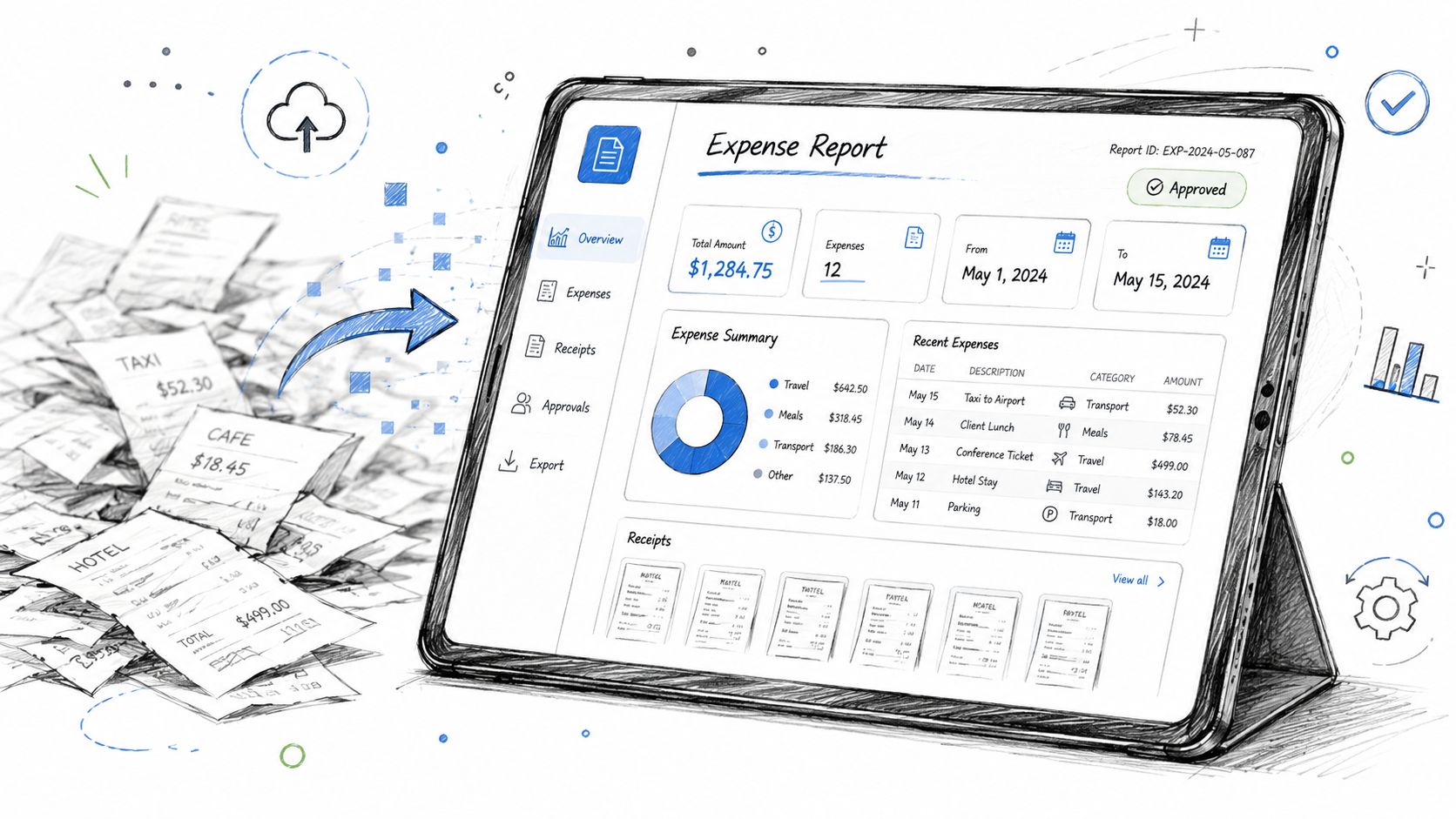
What software actually changes
Expense tools do not replace judgment. They act more like a filing assistant that catches details early.
Common improvements include:
- Receipt capture right away: You save the proof while you still know what the purchase was for
- Auto-filled details: Many tools read the date, vendor, and amount from the receipt image
- Category suggestions: Repeating expenses are easier to label the same way each time
- Notes attached to each expense: You can record the client, project, and business purpose before you forget
- Cleaner bookkeeping handoff: Fewer details have to be typed again later
That last point matters more than many new business owners expect. If your records live in one app, your receipts in another folder, and your explanations only in your head, your expense report is much more likely to fall apart under questions.
When it makes sense to upgrade
You do not need software just because someone says a real business should have it. You need it when your current method starts creating errors, delays, or missing proof.
For many freelancers, the signs are simple:
- You postpone reports because gathering receipts takes too long
- You forget what a purchase was for by the time you record it
- Your categories change from month to month
- Your bookkeeper has to ask follow-up questions about the same types of expenses
- You worry that your records would be hard to explain in an audit
If that sounds familiar, a tool is not about looking more professional. It is about building a record you can depend on.
If you want a starting point, BookkeepDIY's expense management directory can help you compare expense management options in plain language.



