

Year-end close usually goes sideways in a very specific way. December ends, January gets busy, and suddenly you are chasing missing receipts, clearing old vendor balances, and trying to decide whether the numbers in your reports are incomplete or wrong.
A useful year end closing checklist does more than list tasks. It puts them in the right order, sets clear stopping points, and shows how to get through the work inside your bookkeeping system without losing hours to open tabs and scattered notes. That matters if you handle the books yourself and it matters just as much if a small team is splitting the work.
The goal is not just closed books. The goal is books you can trust, with support behind each balance and a clean trail for your tax preparer, lender, or future audit questions.
This guide is built for that reality. It starts with the items that affect everything downstream, then moves into adjustments, reporting, tax prep, and record retention. Along the way, it shows how to use BookkeepDIY workflows to speed up review, catch common errors, and keep the process manageable. If you rely on connected accounts, rules, and bank imports, start with this practical guide to bank feeds and reconciliation workflows so the rest of the close sits on clean data.
What follows is the version I would use with a small business owner who wants fewer surprises this year and a faster close next year. It is prioritized for real bookkeeping work, not theory, and it focuses on how to move from one step to the next with control.
1. Reconcile Bank and Credit Card Accounts
A year-end close gets messy fast when cash is off by even a small amount. One duplicated bank-feed import or one transfer posted twice can throw off the balance sheet, the profit and loss, and every review step that comes after.
Start by tying each bank account and credit card account to the year-end statement balance. Match cleared deposits, payments, transfers, merchant fees, interest, and refunds. Then isolate the items that did not clear and decide whether they belong in the books, need correction, or should be removed.
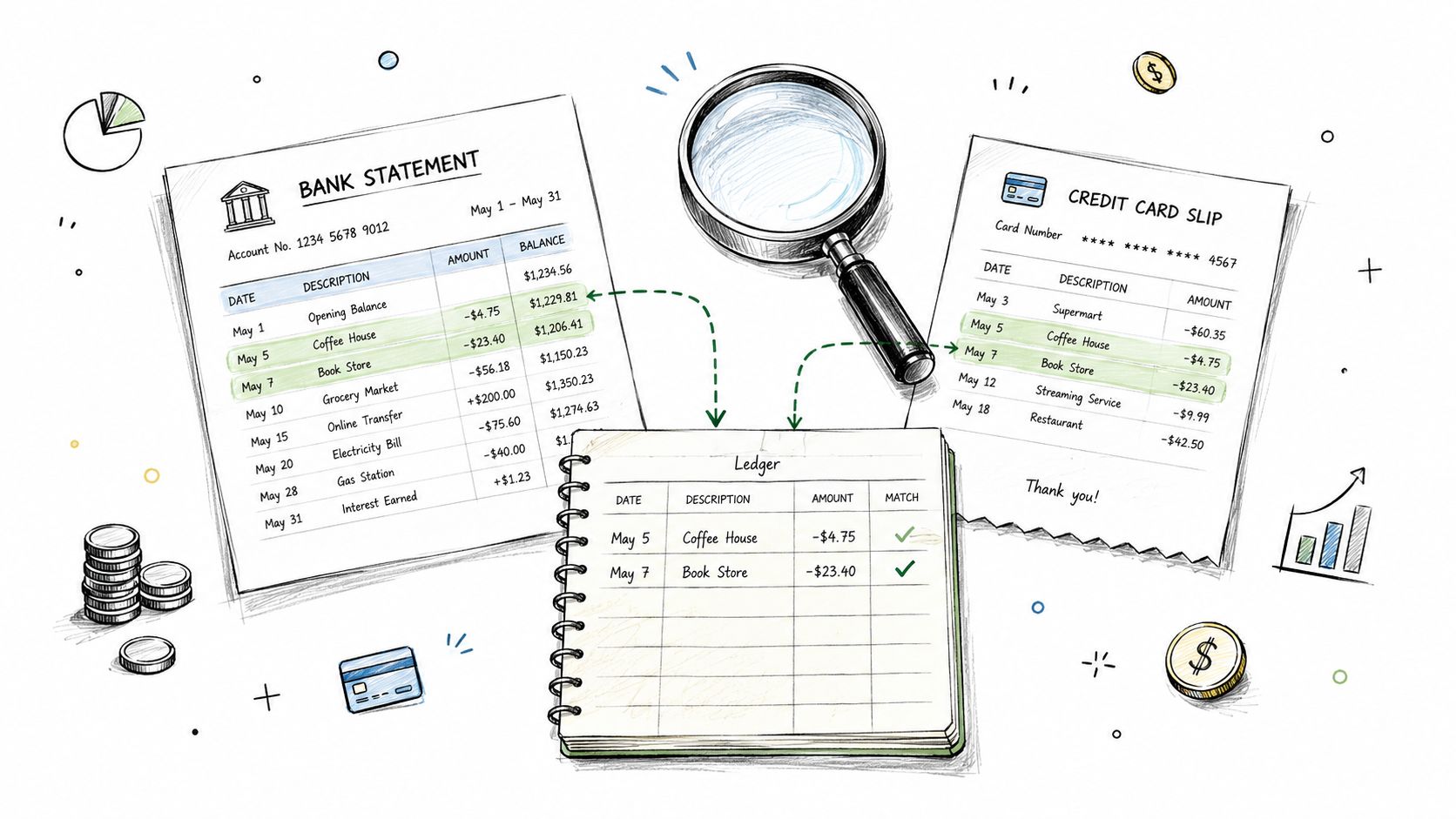
The errors I see most often in small business files are ordinary, not dramatic. A payment imported twice. A transfer recorded as an expense in one account and ignored in the other. Card charges parked in uncategorized or suspense for months. Old checks still listed as outstanding even though they were replaced, voided, or never valid in the first place.
If you use connected accounts, the order of review matters. Do not bulk-accept feed items and hope the reconciliation screen catches the problems later. Review feed rules first, then work through transactions in a set order: uncategorized items, transfers, fees and interest, then old uncleared items. That sequence catches the mistakes that waste the most time at year end.
A good workflow inside software is simple and repeatable. Use tools from the BookkeepDIY bank feeds and reconciliation directory that let you filter unmatched transactions, review bank rules, and match imported activity to existing entries before creating anything new. That last step matters. Matching first prevents duplicate income, duplicate expenses, and duplicate owner transfers.
Use this checklist while you reconcile:
- Match first, classify second: Link imported transactions to existing invoices, bills, transfers, and payments before adding new entries.
- Review transfers as pairs: A transfer should hit both sides correctly. If one side is missing or misclassified, fix that before closing.
- Filter by age: Look closely at uncleared items that are still open from prior months, especially old checks and card payments in transit.
- Trace exceptions to source documents: Pull the receipt, statement, deposit detail, or prior entry instead of guessing from the bank description.
- Document each correction: Add a memo or workpaper note so you know later why an item was reclassed, voided, or written off.
One practical judgment call comes up often. An old reconciling item does not become acceptable just because it is small. If it cannot be explained, research it now. If it is stale, clear it with a documented correcting entry. Clean reconciliations come from resolved differences, not from leaving questionable items parked in the file.
2. Review and Close General Ledger Accounts
A bank reconciliation can be clean while the ledger is still wrong. I see this when a loan deposit sits in income, a card refund lands in sales, or a new piece of equipment gets buried in office expense. Cash may tie out, but the books still misstate the year.
Review the ledger by priority, not by scrolling from top to bottom. Start with accounts that can change decisions, tax reporting, or owner distributions. For most small businesses, that means receivables, payables, loans, payroll liabilities, sales tax, fixed assets, and equity. Then move to lower-risk expense accounts and miscellaneous balances.
The fastest way to do this is with filters, not guesswork. In the BookkeepDIY directory, look for general-ledger review and month-end close tools that let you sort by account, date range, source, user, memo, and amount. Good filters save time because they surface the entries that deserve judgment.
How to review the ledger without wasting an afternoon
Export the year-to-date general ledger detail, then work account by account with a short review routine:
- Sort by largest dollar amount first: Big miscoded entries usually do more damage than small ones.
- Filter for manual journals: Year-end problems often sit in entries posted directly to balance sheet or income statement accounts without clear support.
- Scan for unusual account activity: Revenue accounts with vendor names, expense accounts with customer names, or loan accounts with regular operating transactions are all worth checking.
- Filter for round numbers: Clean numbers like 1,000 or 5,000 often signal estimates, reclasses, or placeholders that need backup.
- Review postings near period-end: Late entries are not automatically wrong, but they deserve a second look because cutoff errors tend to collect there.
One practical test helps. Ask, "Can I explain this balance from source documents and a simple schedule?" If the answer is no, the account is not ready to close.
Keep the review focused on what the account is supposed to do. Prepaid insurance should tie to actual policy periods. Loan balances should tie to statements and principal schedules. Owner draw or distribution accounts should reflect owner activity, not mixed operating expenses that were dumped there to deal with later.
This is also the point to clean up old suspense, ask-my-accountant, uncategorized, and miscellaneous accounts. Those balances do not become acceptable because the amount is small. Clear them while the year is still fresh and document why each item was moved.
A ledger review is not a visual scan for anything that "looks fine." It is a support test. If an account balance cannot be traced to detail, statements, invoices, or a worksheet you would be comfortable handing to a tax preparer, keep working. That discipline is what turns a year-end close from a rushed cleanup into a controlled process.
3. Record Adjusting Entries and Accruals
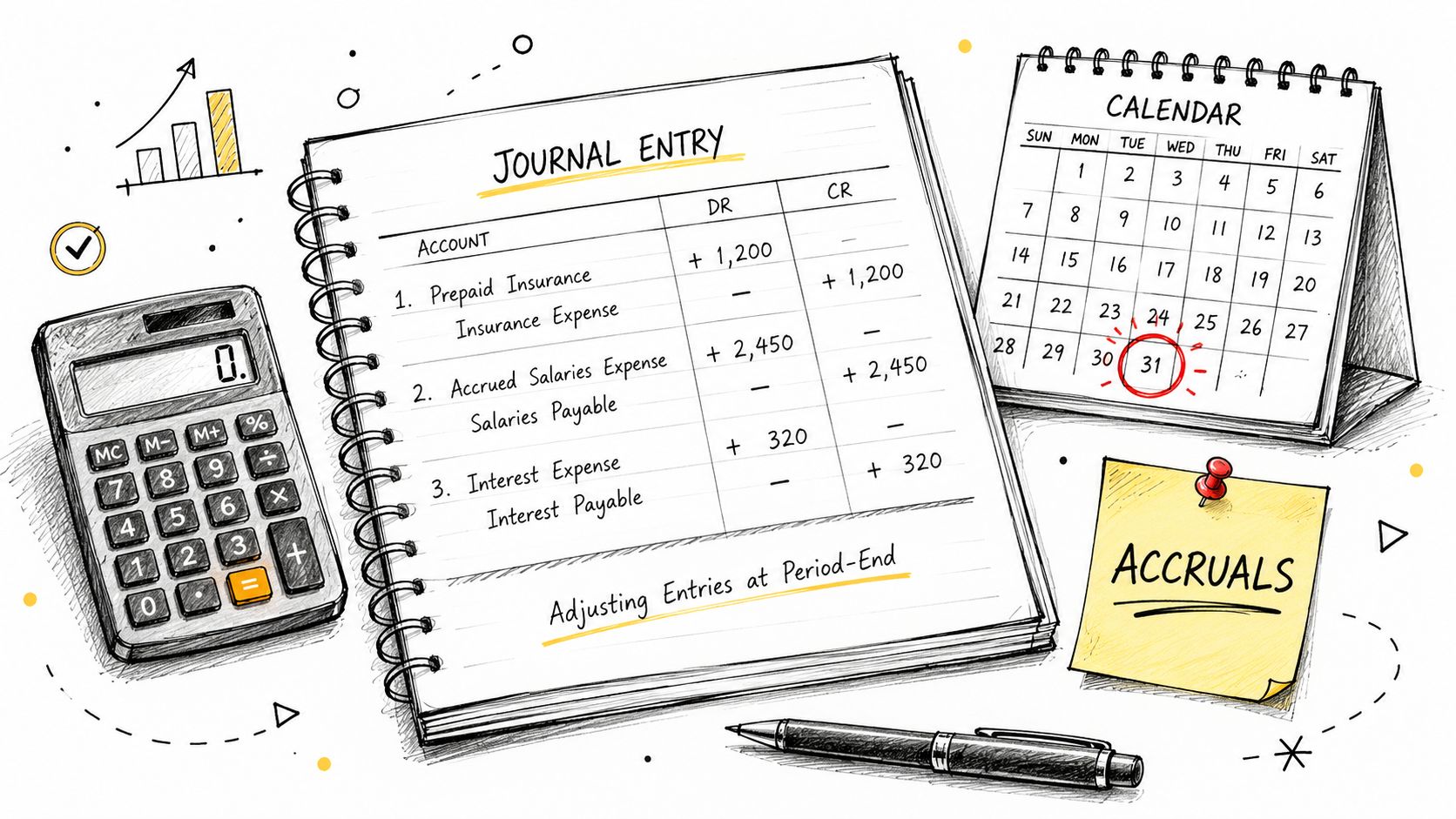
A lot of year-end books look clean right up until adjusting entries expose what was left in the wrong period. December payroll hits in January. Insurance was paid up front but expensed all at once. Work was finished before year-end, but the invoice went out later. If those items stay untouched, the books may balance and still misstate the year.
The job here is simple to describe and easy to mishandle. Put income and expenses in the period where they were earned or incurred, then document the entry well enough that someone else can follow it without guessing.
Start with the adjustments that usually matter most to a small business. Accrued payroll, payroll taxes, prepaid expenses, depreciation, unpaid vendor costs, and earned but unbilled revenue are usually higher priority than minor cleanups. A prioritized checklist helps because not every adjustment carries the same risk. If time is tight, post the entries that would materially change profit, liabilities, or tax reporting first.
A practical posting routine
Use one working paper for each entry. Keep the format consistent: account names, date, reason for the adjustment, calculation, support file, and whether the entry reverses next period. That structure saves time when you review the books later or hand them to a tax preparer.
If you use BookkeepDIY to organize the close, filter the directory for accrual, prepaid, fixed asset, and month-end close workflows first. Then choose the tools that match the specific job instead of hunting through everything at once. For example, use an accrual worksheet template for unpaid expenses, a prepaid schedule for annual policies and software subscriptions, and a depreciation tracker tied to your fixed asset list. The point is not adding more software. The point is reducing judgment calls on routine entries.
Focus on entries like these:
- Accrued expenses: Record costs incurred before year-end that have not been billed yet.
- Prepaids: Move the unused portion to the balance sheet and expense only the coverage used this year.
- Depreciation: Update the fixed asset schedule, then post the annual or monthly depreciation entry from that support.
- Revenue cutoffs: Record revenue earned before year-end, even if invoicing happens after the close.
One rule keeps this section under control. If you cannot explain the entry in one sentence and point to the support in one file, it is not ready to post.
There is also a trade-off here. Small business books do not need every possible accrual if the amount is trivial and the extra work adds no decision value. They do need consistency. If you accrue payroll at year-end, do it the same way each year. If you expense small annual renewals immediately because the amount is immaterial, document that policy and stay consistent. Clean books come from repeatable rules, not heroic cleanup entries in December.
Avoid plug entries. A journal entry posted just to make the profit and loss "look right" usually creates more work later, especially when the tax preparer asks what it was for and why it reversed, or did not.
4. Prepare and Verify Financial Statements
December is when many owners finally print the reports and see numbers that do not match the year they just lived through. Sales looked strong, but cash stayed tight. Profit appears healthy, but liabilities seem off. That is usually not a reporting problem. It is a close problem that the statements are exposing.
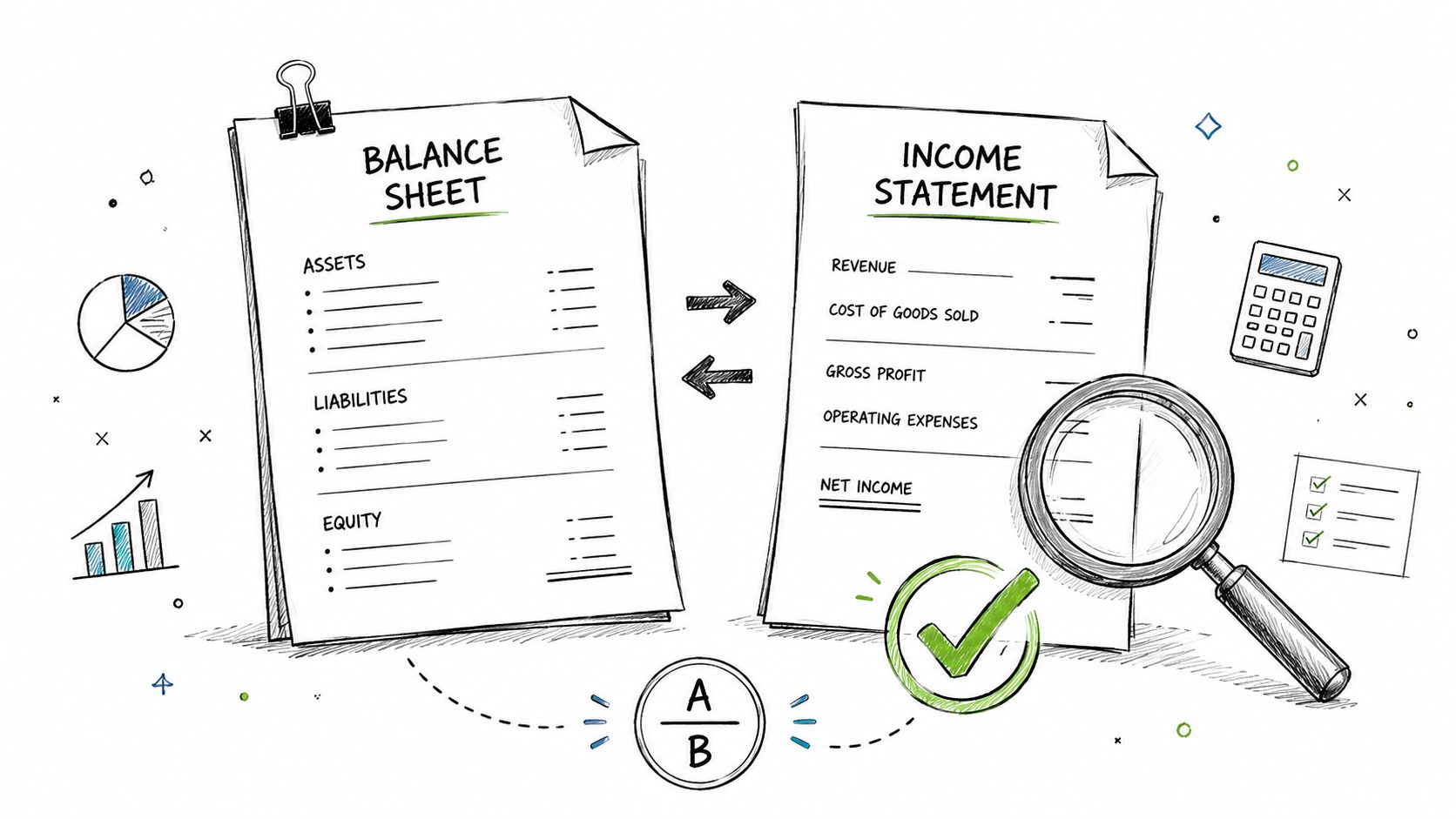
Your year-end package should include the profit and loss statement, balance sheet, cash flow statement, and a budget-to-actual variance report. Many small businesses also keep receivable and payable summaries with the package so each major number has support behind it.
Do not stop at exporting PDFs. Verify them.
Start with the balance sheet because it catches more close errors than the profit and loss. Cash should tie to reconciled accounts. Loan balances should match lender statements. Sales tax, payroll liabilities, and credit cards should line up with what is still owed. If retained earnings moved in a way you cannot explain, revisit prior entries before sharing the reports with a lender, tax preparer, or partner.
Then review the profit and loss with a practical question. Does it reflect the business you ran this year? Large swings in rent, payroll, merchant fees, subcontractors, or owner distributions often point to coding mistakes, missing accruals, or items posted to the wrong period. A clean statement does not mean every expense is perfectly categorized. It means the remaining miscoding is small enough that it will not distort decisions or tax work.
The cash flow statement is the final reasonableness check. If it shows strong operating cash flow but you spent the year juggling payment timing, examine receivables, payables, inventory, and loan activity again. Small business cash flow reports can look strange when one big transaction is misclassified.
A simple review workflow helps here. In your accounting system, run comparative reports for this year versus last year and scan for unusual variances over a threshold you set. Then use BookkeepDIY directory filters to find reporting and close-support tools that help with variance analysis, financial reporting, and month-end review. Good filters are straightforward: by report type, by integration with your ledger, by close checklist features, and by export options for accountant review. The goal is not more dashboards. The goal is faster explanation of unusual balances.
Questions to answer before you finalize the statements:
- Can each major balance sheet account tie to a supporting schedule?
- Can you explain large year-over-year swings in plain language?
- Do net income, equity activity, and cash movement fit together logically?
- Would another reviewer understand the file package without asking what a number represents?
If the answer is no, keep working the close. Financial statements are not the reward for finishing the checklist. They are the proof that the checklist was done correctly.
5. Reconcile Accounts Receivable and Payable
If bank reconciliation tells you what happened in cash, receivables and payables tell you what still needs attention, revealing to many small businesses they've been more profitable on paper than in reality.
A strong close process includes reconciling subledgers to the general ledger before generating statements. In benchmarking cited by Vena Solutions on the close process, firms using ERP-integrated reconciliation tools reduced the average close timeline from 10 days to under 4 days, and the same source reports a 92% improvement in data accuracy. The same benchmark also says manual variance errors typically account for 35% of year-end correction workloads.
Those numbers line up with what happens in smaller shops too. The mess is usually in old invoices, duplicate vendor bills, unapplied credits, and timing differences nobody chased during the year.
Where software actually helps
Use your accounting system's aging reports, then layer in tools from BookkeepDIY's Accounts Receivable & Collections and Accounts Payable Automation categories. Good filters are simple: invoices over a set aging threshold, unapplied payments, vendor statements not yet matched, and bills entered after the close cutoff but related to the prior year.
- For receivables: Sort by oldest open invoices first, then review disputed balances separately from unpaid ones.
- For payables: Compare vendor statements to your ledger to catch missing bills and duplicates.
- For both sides: Tie the subledger totals back to the general ledger before you call the file done.
Most year-end surprises in AR and AP weren't created in December. December is just when someone finally looks closely.
6. Reconcile Payroll and Review Year-End Tax Filings
A lot of year-end panic starts here. The payroll service says one set of year-to-date totals, the general ledger says another, and now W-2s or 1099s are days away.
Fix the tie-out before any forms go out. Payroll touches wages, employer taxes, employee withholdings, benefits, reimbursements, and liability accounts, so even a small setup mistake can spill into both the financials and tax filings. If the payroll reports do not match the books, treat that as a stop sign.
Start with a clean sequence. Pull the full-year payroll summary, then compare it to the general ledger by category, not just in total. Wages should tie. Employer payroll taxes should tie. Employee tax withholdings, benefit deductions, and payroll liabilities should tie too. If one bucket is off, trace the difference by payroll date until you find the journal, mapping error, or missed manual entry that caused it.
The practical shortcut is to use software that posts payroll journals consistently and gives you filters for exceptions. The payroll software section of BookkeepDIY is a good place to find tools that sync payroll into the ledger and make it easier to review employee records, contractor records, and filing settings before deadlines get tight.
A few checks catch most year-end payroll problems:
- Match payroll reports to liability accounts: Confirm payroll tax payable, benefits payable, and other withholding accounts clear the way they should.
- Review employee and contractor setup: Pay close attention to anyone whose role changed during the year.
- Check year-to-date totals: Look for deductions, taxable benefits, or reimbursements that look out of line with prior payrolls.
- Clean up filing details early: Names, addresses, tax IDs, and status changes need to be correct before forms are created.
- Review final payroll dates and deposit timing: A payroll processed at year-end can hit the books in one period and the bank in another, which creates confusion if you do not document the cutoff.
Classification deserves special attention in small businesses that use a mix of employees and freelancers. A worker who gradually took on set hours, manager oversight, and employee-type duties may need to be reviewed before year-end filings are finalized. That is harder to fix after forms are issued.
Waiting until filing week usually turns a bookkeeping task into a compliance problem. Clean payroll first, then file from numbers you trust.
7. Verify Fixed Assets and Calculate Depreciation
Fixed assets get sloppy when the business is busy. A laptop gets expensed in one month, a renovation gets buried in repairs, and an old asset stays on the books long after it's gone.
Year-end guidance calls for reviewing depreciation schedules and confirming assets are properly accounted for, including disposals and items that became obsolete. Consistency matters here. If you capitalize some purchases and expense similar ones elsewhere, your books stop being comparable.
You don't need fancy asset software if your asset base is small. You do need a fixed asset register that lists purchase date, cost, description, useful life, depreciation method, and disposal date if applicable. Then compare that register to what's physically still in use.
The year-end asset check
- Inspect additions: Was each large purchase handled consistently with your capitalization policy?
- Inspect removals: If something was sold, scrapped, or replaced, remove it from the books.
- Update depreciation: Post the current-year amount only after the register is clean.
The practical trade-off is time versus precision. For a very small business, a disciplined spreadsheet may be enough. Once assets are spread across locations or departments, software tracking starts paying off because the physical check becomes the hard part, not the calculation.
8. Review Inventory and Calculate Cost of Goods Sold
A lot of year-end closes look clean until inventory enters the picture. Then a small counting error, an item received on the wrong day, or damaged stock carried at full value can distort both the balance sheet and cost of goods sold.
For product-based businesses, inventory is one of the few areas where the books have to match the floor, the shelf, or the warehouse bin. Count quantities, confirm what you own at year-end, and make sure valuation follows the same method you use during the year, whether that is FIFO or weighted average. If the method changes casually or old items stay priced like new ones, gross margin stops meaning much.
The practical workflow is straightforward. Run an inventory valuation report before the count. Perform the physical count with sales and receiving paused if possible. Investigate variances before posting adjustments, not after. Then recalculate cost of goods sold from the cleaned inventory records.
Inside the inventory and cost accounting section of BookkeepDIY, filter for tools that support multi-location counts, inventory valuation reports, purchase cost tracking, and adjustment logs. Those filters matter because the right software does more than store quantities. It helps trace why the count is off, which is usually the harder part.
What to check before you finalize COGS
- Control the count window: Pause item movement, or document every sale, return, and receipt that happens during the count.
- Flag problem inventory: Separate damaged, obsolete, expired, or slow-moving items so they are reviewed for write-downs.
- Test cutoff: Check shipping and receiving records around year-end so inventory and COGS land in the right period.
- Review unit consistency: Case-versus-each errors and duplicate SKUs can throw off both quantities and costs.
- Tie the adjustment back to margin: If gross profit swings after count adjustments, trace the reason before closing.
A physical count by itself does not finish the job. The actual work is explaining differences. Shrinkage, unposted receipts, mis-keyed item costs, and returns sitting in the wrong status are common causes.
For a very small business with limited SKUs, a disciplined spreadsheet and a clean count sheet may be enough. Once inventory is stored in multiple locations, purchased at changing costs, or sold in bundles, software usually earns its keep because it gives you a usable audit trail instead of a pile of manual adjustments.
9. Prepare Tax Return and Identify Tax Planning Opportunities
Tax prep starts with clean books, not software. If the year-end close is rushed, the tax return becomes a second cleanup project.
By the time you reach this step, you should already have reconciled accounts, posted adjustments, reviewed payroll, and assembled the final financial package. Then tax prep becomes a matter of translating the books into the filing requirements for your entity and identifying elections, deductions, timing issues, and documentation needs with your tax adviser.
Cloud-based year-end accounting tools with built-in checklist workflows have become mainstream in smaller operations. Numeric reports that adoption reached 68% among small businesses and freelancers in 2024, and the same source says 84% of bookkeepers rate these tools as highly effective for year-end close work. Their notes also emphasize close schedules and touch-base protocols with audit firms as benchmark practices.
How to use tools without outsourcing your judgment
Inside BookkeepDIY's Tax Preparation & Compliance listings, filter for the features that matter most to your setup. For some businesses that's entity support and estimated tax tracking. For others it's document collection, organizer workflows, or integration with bookkeeping software.
Software can surface missing forms and workflow gaps. It can't decide whether your books actually reflect the right tax year.
Keep your support organized. Bank statements, receipts, payroll reports, loan interest records, mileage logs where relevant, and prior-year filings should already be in your year-end folder by now.
10. Document and Archive Year-End Records and Prepare Audit Trail
A year-end close often falls apart months later, not because the numbers were wrong, but because no one can show how those numbers were reached. If a lender asks for support, your tax preparer has a follow-up question, or you need to revisit an estimate next spring, the file should answer it without a scavenger hunt.
Set up one final year-end archive for the fiscal year and treat it as the record of what was approved, posted, and relied on. Include the final income statement, balance sheet, cash flow statement, reconciliations, adjusting-entry support, payroll tie-outs, inventory counts or valuation support, fixed asset schedules, and short memos for unusual accounting treatment. For nonprofits, this file also needs clear support for restricted funds and donor intent. AFP Global highlights the risk of missing those steps when standard templates are too generic.
The practical standard is simple. Another person should be able to open the file, trace a balance to its support, and understand any judgment calls without asking you to explain the whole close.
Build an audit trail that holds up
Inside the BookkeepDIY directory, filter for document management, bookkeeping integrations, receipt capture, and month-end or year-end workflow features. That helps narrow the list to tools that fit your process instead of adding another app your team ignores. The goal is not more storage. The goal is a file structure that keeps the support attached to the accounting decision.
Use a clear folder structure by area, then by account or task. For example, keep separate folders for bank reconciliations, AR and AP support, payroll, fixed assets, inventory, journal entries, and financial statements. If your software allows tags or custom fields, tag records as "year-end," "final," and "adjusting entry support" so you can pull them back quickly.
- Save final versions only: Draft exports create confusion. Keep the reviewed or approved file.
- Store support with the entry: If you booked an accrual, save the calculation, invoice, and approval in the same folder.
- Write short memos where judgment was involved: Expense versus capitalization, reserve assumptions, cutoff decisions, owner distributions, and grant restrictions should be documented in plain language.
- Lock down naming conventions: A file named "JE-12 Accrued bonuses 2024 final.pdf" is useful. "scan003.pdf" is not.
- Preserve the source: Bank statements, payroll reports, signed loan documents, count sheets, and tax notices should sit beside your summaries, not be replaced by them.
This step takes discipline, and there is a trade-off. A lighter file is faster to assemble, but it usually creates follow-up questions later. A heavier file takes more time now, but it cuts cleanup work when an accountant, auditor, lender, or future-you needs to trace a number back to the source.
10-Item Year-End Closing Comparison
| Task | Implementation Complexity 🔄 | Resource Requirements ⚡ | Expected Outcomes 📊⭐ | Ideal Use Cases 💡 | Key Advantages ⭐ |
|---|---|---|---|---|---|
| Reconcile Bank and Credit Card Accounts | Medium 🔄, routine matching; can be time-consuming if disorganized | Moderate ⚡, bank access, reconciliation tools, 1 person per account (2–4 hrs) | 📊 Accurate cash balance; timely error/fraud detection · ⭐⭐⭐ | Small–medium businesses with frequent bank/card activity; monthly/year-end close | Ensures cash accuracy; provides audit trail; detects duplicates/fraud |
| Review and Close General Ledger Accounts | High 🔄, detailed account-by-account audit and period close | High ⚡, experienced bookkeeper/accountant, GL reports, review time | 📊 Correct classifications and period reporting; audit-ready balances · ⭐⭐⭐⭐ | Companies finalizing year-end statements or with complex chart of accounts | Prevents misclassification; supports reliable financial statements |
| Record Adjusting Entries and Accruals | High 🔄, requires judgment and estimate calculations | Moderate–High ⚡, schedules, supporting calculations, possible CPA input | 📊 Proper revenue/expense matching; accurate period results · ⭐⭐⭐⭐ | Accrual-basis entities, businesses with unpaid invoices, prepaid costs, depreciation | Ensures economic accuracy; improves tax and performance metrics |
| Prepare and Verify Financial Statements | High 🔄, compiles multiple statements and disclosures | High ⚡, consolidated data, reviewers, accounting software, CPA review recommended | 📊 Stakeholder-ready reports; meaningful ratios and trend analysis · ⭐⭐⭐⭐ | Businesses seeking loans, investors, or preparing tax filings | Provides comprehensive financial view; informs decisions and external reporting |
| Reconcile Accounts Receivable and Payable | Medium–High 🔄, invoice matching and aging analysis; dispute resolution | Moderate ⚡, AR/AP reports, aging tools, collections/vendor follow-up | 📊 Clean receivables/payables and improved cash visibility · ⭐⭐⭐ | Firms with many customers/vendors, recurring billing or vendor spend | Identifies overdue/duplicate items; improves cash flow management |
| Reconcile Payroll and Review Year-End Tax Filings | High 🔄, multi-jurisdiction rules and payroll nuances | High ⚡, payroll system/service, tax forms, payroll register, CPA as needed | 📊 Compliance with payroll taxes and accurate W-2/1099s · ⭐⭐⭐⭐ | Employers of any size, especially multi-state payroll or contractor mix | Ensures tax compliance; avoids penalties and employee disputes |
| Verify Fixed Assets and Calculate Depreciation | Medium–High 🔄, physical verification plus capitalization judgments | Moderate ⚡, asset register, physical count, invoices, asset software | 📊 Accurate asset values and depreciation expense · ⭐⭐⭐ | Asset-intensive businesses (manufacturing, services with equipment) | Prevents asset misstatement; informs replacement and tax deductions |
| Review Inventory and Calculate COGS | High 🔄, physical counts and valuation method impacts profit | High ⚡, inventory system, count teams, reconciliation time | 📊 Correct COGS and gross margin; shrinkage/obsolescence identified · ⭐⭐⭐⭐ | Retail, e-commerce, manufacturing with inventory across locations | Ensures correct gross profit; reveals shrinkage and slow-moving stock |
| Prepare Tax Return and Identify Tax Planning Opportunities | High 🔄, complex, changing tax rules; professional judgment required | High ⚡, CPA/tax software, full supporting records, planning time and fees | 📊 Compliant filings and optimized tax position; reduced liabilities · ⭐⭐⭐⭐ | Year-end tax filing, strategic tax planning, entity-structure review | Identifies credits/deductions; reduces tax burden; avoids penalties |
| Document and Archive Year-End Records and Prepare Audit Trail | Medium 🔄, organizational and documentation work | Moderate ⚡, cloud storage, document management, staff time | 📊 Audit-ready records and continuity for reviews/transitions · ⭐⭐⭐ | Organizations preparing for audits, staff transitions, or regulatory retention | Speeds audit response; preserves institutional knowledge; ensures compliance |
Your Books Are Closed. Now What?
Congratulations. You've finished the hard part, and you've done more than check boxes. A proper year end closing checklist gives you a clean starting point for the next year, stronger tax prep, and reports you can trust.
That trust matters. Once the close is done, you can stop guessing about whether cash is tight because of timing, whether margins are slipping, or whether payroll, inventory, and payables are creeping in the wrong direction. Your year-end reports become useful management tools instead of compliance paperwork.
This is also the right time to review the process itself. Where did you lose time. Which items required detective work. Which reports were easy to produce, and which ones depended on memory, side spreadsheets, or one person who “just knows” how things are supposed to work. Those are your next improvement targets.
For many small businesses, the biggest gains come from tightening the workflow rather than adding more effort. Set a close schedule earlier. Reconcile key accounts monthly. Use software categories that match the actual work, such as bank reconciliation, payroll, inventory cost accounting, receivables, payables, and tax prep. Build a repeatable folder structure. Keep support for every balance sheet account. If you're consistent with those habits, next year won't feel like a rescue mission.
Tool choice matters here, but not in the way marketing often suggests. The best software isn't the one with the longest feature list. It's the one your team will use consistently, the one that fits your transaction volume, and the one that supports the control points that matter most in your business. A freelancer needs a different stack than a product business with inventory. A nonprofit needs different review steps than a services firm with contractors. Good process design respects those differences.
If you're a small business owner doing the books yourself, don't try to perfect everything at once. Start by locking in the recurring close workflow. Build your year folder. Reconcile cash first. Tie AR and AP to the ledger. Review payroll. Update fixed assets. Count inventory if you carry it. Archive support as you go. That's how year-end gets manageable.
And once the close is complete, use the numbers. Revisit pricing. Review customer payment patterns. Check spending by category. Plan hiring with actual payroll history. Adjust purchasing based on inventory reality. The value of the close isn't only that the books are finished. It's that the business is clearer now than it was a month ago.
BookkeepDIY helps freelancers, small business owners, and finance admins turn year-end cleanup into a repeatable system. Use BookkeepDIY to compare bookkeeping and accounting software by workflow, filter tools by category, and learn the plain-language definitions behind the reports and tasks in your close process. If you want a smoother next close, start by building your stack around the work you do.



